Dump Reload Level I to II

JLovegren

Member
I hate to ask an unsmart question but...
Windows

I did a dump of data and sequences of a v9.1 workgroup database with Level I storage and a load into a v12.8 workgroup database with Level II storage.

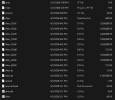
I noticed that it appears that all of the data went into my schema area.
I may not know how to read it properly but from a file size standpoint it seems to be that.

The dump was straight forward and so was the load.
To be clear, I had previously created the v12.8 database and was running it in "test environment". I am refreshing the data with backed up data from v9. This is a go live simulation.

Before doing this I did not note the size of schema extent but it is now the size of my whole database which is odd and indicates that I may have missed a step.


I will share my set file and the screenshot of the data folder.
1775262619268.png
my set file:
____________________________________
#
b E:\AriesBI\Aries.b1 f 819200
b E:\AriesBI\Aries.b2
#
d "Schema Area":6,64;1 D:\AriesDB\Aries.d1
#
a F:\AriesAI\Aries.a1
#
a F:\AriesAI\Aries.a2
#
a F:\AriesAI\Aries.a3
#
d "DataArea":10,128;64 D:\AriesDB\Aries_10.d1 f 1024000
d "DataArea":10,128;64 D:\AriesDB\Aries_10.d2 f 1024000
d "DataArea":10,128;64 D:\AriesDB\Aries_10.d3 f 1024000
d "DataArea":10,128;64 D:\AriesDB\Aries_10.d4 f 1024000
d "DataArea":10,128;64 D:\AriesDB\Aries_10.d5 f 1024000
d "DataArea":10,128;64 D:\AriesDB\Aries_10.d6
#
a F:\AriesAI\Aries.a4
#
a F:\AriesAI\Aries.a5
#
a F:\AriesAI\Aries.a6
#
a F:\AriesAI\Aries.a7
#
a F:\AriesAI\Aries.a8
#
a F:\AriesAI\Aries.a9
#
a F:\AriesAI\Aries.a10
#
d "IndexArea":20,128;64 D:\AriesDB\Aries_20.d1 f 1024000
d "IndexArea":20,128;64 D:\AriesDB\Aries_20.d2 f 1024000
d "IndexArea":20,128;64 D:\AriesDB\Aries_20.d3

______________________________________________________
 
I did a dump of data and sequences of a v9.1 workgroup database
I assume you mean a dump of data, sequence values, and schema.

It is the schema that contains the mapping of schema objects (tables, indexes, and LOBs) into storage areas. If you loaded the same schema into your target database that you dumped from your source, then the area assignments would be unchanged. For example, if all objects in your v9 database are in the schema area, then loading that same schema into 12.8, followed by a data load, would put those objects into the new schema area.

What seems to be missing from your process is a change to the mapping of objects to areas. You can do this in a few ways. You can dump the .df and then manually modify the " AREA " line items, save the .df file, and load it into the target; or you can load the .df into a temporary schema holder database, move the objects to the desired locations, and then dump a new .df to be loaded into your target; or you can load the .df into your target database, move the empty objects to their desired areas via proutil -C tablemove/idxmove commands, and then load your data.
 
Note: if you are doing “tablemove”… that step should be with a database that has the schema but NO data yet. Technically you can move populated tables but it is EXTREMELY slow and EXCRUTIATINGLY painful for non trivial amounts of data. Like in days or weeks…
 
you can use 'proutil <db> -C viewB2 [-csoutput -verbose]'
Note that adding "-csoutput -verbose" provides the same output to stdout as without it. But it also creates a file called dbname.viewB2.txt in the current directory. This makes the data much easier to parse programmatically, or import into a spreadsheet or table.
 
I assume you mean a dump of data, sequence values, and schema.

It is the schema that contains the mapping of schema objects (tables, indexes, and LOBs) into storage areas. If you loaded the same schema into your target database that you dumped from your source, then the area assignments would be unchanged. For example, if all objects in your v9 database are in the schema area, then loading that same schema into 12.8, followed by a data load, would put those objects into the new schema area.

What seems to be missing from your process is a change to the mapping of objects to areas. You can do this in a few ways. You can dump the .df and then manually modify the " AREA " line items, save the .df file, and load it into the target; or you can load the .df into a temporary schema holder database, move the objects to the desired locations, and then dump a new .df to be loaded into your target; or you can load the .df into your target database, move the empty objects to their desired areas via proutil -C tablemove/idxmove commands, and then load your data.
 
This is what I needed, gentlemen!

Just a couple more questions:
1. I will modify the data definition file to work properly.
Would it be quicker to load the revised data definitions into the target system and then re-load the data into the pre-existing structure?
If so, do I need to do something to shrink the schema area container?
Since the target is not yet live, I can delete all the files and start again with prostrct and create a new set of containers and load the definitions properly this time.

2. Once completed, when I export the data definitions to store in my data recovery plan - can I assume that result will be exactly what I put in, with the exception to new tables/fields added later?

Thanks Rob, Tom and George - from the bottom of my heart!
 
Delete the target database and start over. You can't shrink extents.

Regarding data recovery, it is good that you are thinking about that! I will give you my preferred approach.

The database schema is tightly coupled with the application code. A particular version of your application has a set of files: source code, configuration files, and perhaps other assets/dependencies. These should already reside in the appropriate control systems: source and other text files in source code control (e.g. git) for versioning/management, binary deployment assets in an artifact repository, etc. Each version of the code also requires a specific version of the database schema to compile correctly, so your definition file should also have a place in your code repo.

Caveat: when you dump a full definition file (.df) from a database via the Data Dictionary, it provides (in my opinion) a combination of schema object definitions (e.g. tables, indexes, and sequences), and possibly site-specific database configuration settings (assignment of objects to storage areas, object-level Alternate Buffer Pool assignments, object-level Transparent Data Encryption assignments, SQL widths for various fields, etc.). Based on your situation and which database features or add-on products you use, this distinction may not be a concern. If you don't use the optional features I mentioned, or if your application resides only in a single deployment, it may be a moot point. But I don't like the fact that Progress muddies the waters, putting different classes of data together in the same file and calling them all "schema".

Because of this, I prefer to strip out these deployment-time configurations and store a .df that contains just the generic definitions in the code repository. Then the DBA can create a new database, or upgrade the schema of an older database via the schema-delta functionality in the Data Dictionary without having to deal with a bunch of false positive differences (different SQL widths, area assignments, policies, etc.) between old and new.
 
While I am in the process of building a dump & load process I find it helpful to make a backup of the empty database after all of the schema has been loaded and the area assignments are complete. I then save that somewhere.

Then, after a dry run which loads all of the data and builds all of the indexes, I can restore that backup on top of that structure and have a new target that has gone through all of the growth and expansion. The second and third and 58th dry runs won't need to do that. And they will be somewhat faster as a result. And I won't have to go through the process of loading the df file and assigning objects to areas.

Unless, of course, someone makes a schema change. But normally schema gets frozen during these sorts of projects. Or at least when you get close to the end.
 
While I am in the process of building a dump & load process I find it helpful to make a backup of the empty database after all of the schema has been loaded and the area assignments are complete. I then save that somewhere.

Then, after a dry run which loads all of the data and builds all of the indexes, I can restore that backup on top of that structure and have a new target that has gone through all of the growth and expansion. The second and third and 58th dry runs won't need to do that. And they will be somewhat faster as a result. And I won't have to go through the process of loading the df file and assigning objects to areas.

Unless, of course, someone makes a schema change. But normally schema gets frozen during these sorts of projects. Or at least when you get close to the end.
That's an excellent idea. I have already loaded the data to make sure all is currently where it should be. Testing now. I think I will do that although going through the prostrct create, copying the empty8, loading the definitions and then loading the data is not something that I will be skipping anytime soon. I need to get this rhythm down so I will recognize a missed step - even though I will document everything.
 
From a data restore standpoint:
If I need to restore from backup - I can simply do a prorest command and everything goes back to where it belongs due to the storage areas being defined within each table and that itself will be backed up and restored?

In other words, if I am migrating to another server with identical drive paths, then running prorest would be enough. Any other task, like changing my after image storage location to a different drive, would require going through the whole process again, right?

I am also assuming that indexes are rebuilt as the data is loaded, so I do not need to rebuild indexes.
 
When you restore from a backup, you are creating a new database. That database will have the same data storage areas, and assignment of objects to those areas, as the source database from which the backup was taken.

As to where the extents of those areas are stored, you have two options:
  • You can restore without a structure file, e.g. into an empty directory.
    • This will create one variable-length extent per storage area. All extents will be in the current directory.
  • You can restore in a directory that contains a structure file. The structure file must be valid for that database.
    • The structure file must have the appropriate name.
    • It must contain the same storage areas as the source database, with the same records-per-block and blocks-per-cluster settings as in the source database.
    • You can change the number of extents per areas, as well as their type (fixed versus variable), size, and location. So if you need the restored database to have extents in more than one directory, or more than one extent per area, then you would restore this way.
Any other task, like changing my after image storage location to a different drive, would require going through the whole process again, right?

Regardless of how you run the prorest command, the restored database does not have after image areas and AI is disabled. You will have to reconfigure after imaging if necessary. That is just a matter of adding AI extents, taking a backup, and enabling AI. You can do it offline or online.

I am also assuming that indexes are rebuilt as the data is loaded, so I do not need to rebuild indexes.

Restoring a database from a backup does not change the logical location of the records, so it does not invalidate the index entries. No indexes are rebuilt. The index blocks are simply copied into the target databases as is.

In other words, if I am migrating to another server with identical drive paths, then running prorest would be enough.

Note that prorest doesn't require the target server to have the same partitions or directories as the source. However it does make sense to preserve those things in a server migration, as you can avoid having to fix scripts or business processes that assume certain paths exist.
 
Thank you for the good information. I thought that since the After Imaging is handled in OE Explorer that re-starting the database from that console would enable the AI and AI archiver, etc. the same way it remembers the database location, server settings, etc. I need to update my procedure.

So, to be clear, a dump/reload itself, "data only" does not require an index rebuild.

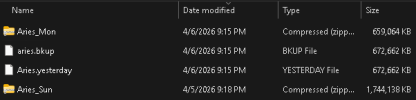
I also found that the backup size has been reduced to like half after properly setting the .df file to segregate data from indexes. It is almost unsettling.

1775575546749.png
 
So, to be clear, a dump/reload itself, "data only" does not require an index rebuild.
Yes it does.

Each index on a table contains as many index entries as there are records. Each index entry consists of the key value (the field value or set of fields values, for each of the fields in the index definition) and the rowid.

Dumping records from a source database and loading them into a new target database changes all of the rowids. The rowid of a record is its logical address.

There is more than one way to "dump and load":
  • ASCII (Data Dictionary) dump and load.
  • ASCII (Data Dictionary) dump and bulk load (proutil -C bulkload)
  • Binary dump and load (proutil -C dump/dumpspecified and proutil -C load)
For ASCII load, index entries are created during the load process, unless you have previously deactivated them. For bulkload and binary load, index entries are not built during the load by default; although with binary load you do have the option of building index entries during load with the "build indexes" parameter.

So regardless of your chosen load method, if that method does not build index entries then you need to perform that step (via proutil -C idxbuild) after the load completes, and before you try to access your application data.

Important: you must back up your database after the load completes and before the index build. This is because it is possible for the idxbuild to crash, and if it does, the database is unusable and must be rebuilt (restore empty database with schema, repeat load).

I also found that the backup size has been reduced to like half after properly setting the .df file to segregate data from indexes. It is almost unsettling.
What is the difference between the two databases? Which version(s) of Progress are involved? If one is v9.1 and the other is 12.8, that could certainly explain the difference. The -com parameter of probkup works completely differently in OE 12.5+.

Also, it looks like you are storing your backups in compressed files. I don't think that will be very beneficial in 12.8.
 
Back
Top