
S
Suzanne Scacca
Guest
Interaction design does need to be meaningful, but it doesn’t just have to be for buttons or info cards. Here are six examples for how to give users meaningful interaction.
Interaction design serves two purposes.
The first is to create an interface that’s usable. Clickable components like buttons, for instance, come alive (i.e., change appearance) when hovered over. This lets users know where and what to engage with.
The other is to create an interface and experience that’s engaging. Carousels and sliders, for example, often require the user to click or pull on the components to make them move. This asks users to pause for a few moments and pay attention to the content.
In both cases, the interface responds to the user, which can create a more memorable experience for them. But do interactive components always need to be meaningful? In other words, does the interaction need to take the user deeper into their journey with the brand? Or can it be there just for the purposes of entertaining or wowing them?
While interaction design can be satisfying to engage with, it does consume some of the precious time we have with our users. And knowing how short their attention spans are, we really can’t afford to waste their time with meaningless content or experiences.
So, the answer to my original question is: “Yes, interaction design always has to be meaningful.” That said, it doesn’t have to be relegated only to buttons and other small clickable components in your interface. Let’s have a look at some examples.
Let’s go beyond clickable buttons and blocks. Here are some interesting ways designers infuse their webpages with meaningful interactivity:
Search is a valuable UI component on ecommerce and other product-based websites. The more products and variations you have, the more important it is to have a smart search bar that helps users find what they’re looking for.
Although Chobani has a search icon and bar in the header, it also has a section just below the fold on the homepage that does something similar. I’d argue this on-page search component is better, as it only shows product results instead of pages, posts, news and recipes.
Here’s how it works:
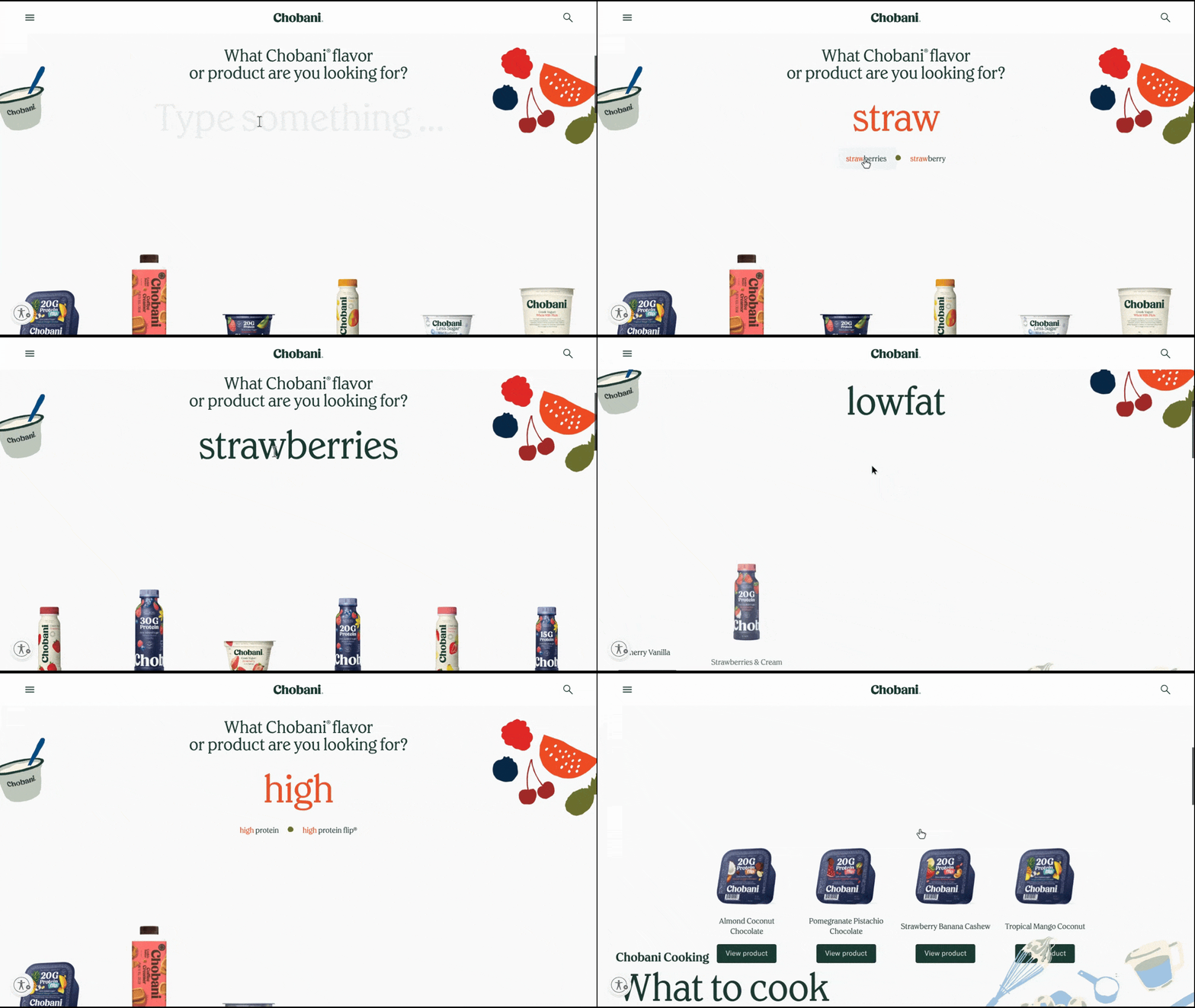
As users type into the “Type something…” field, the search bar auto-populates with matching queries. When clicked, matching product images and names appear below.
This interactive search experience is a great way to show off the brand’s comprehensive product offering. It also can help users discover more products without having to sift through the various category pages in the navigation.
The official website for Van Morrison contains the usual basic website interactivity—like button state changes and a pop-out menu. As a musician, this makes sense as it allows the videos of his music to take center stage and makes the rest of the information easy to focus on and read.
That said, there are two areas of the homepage that are interactive. And it makes total sense why the designer chose to animate them.
Here’s how they work:
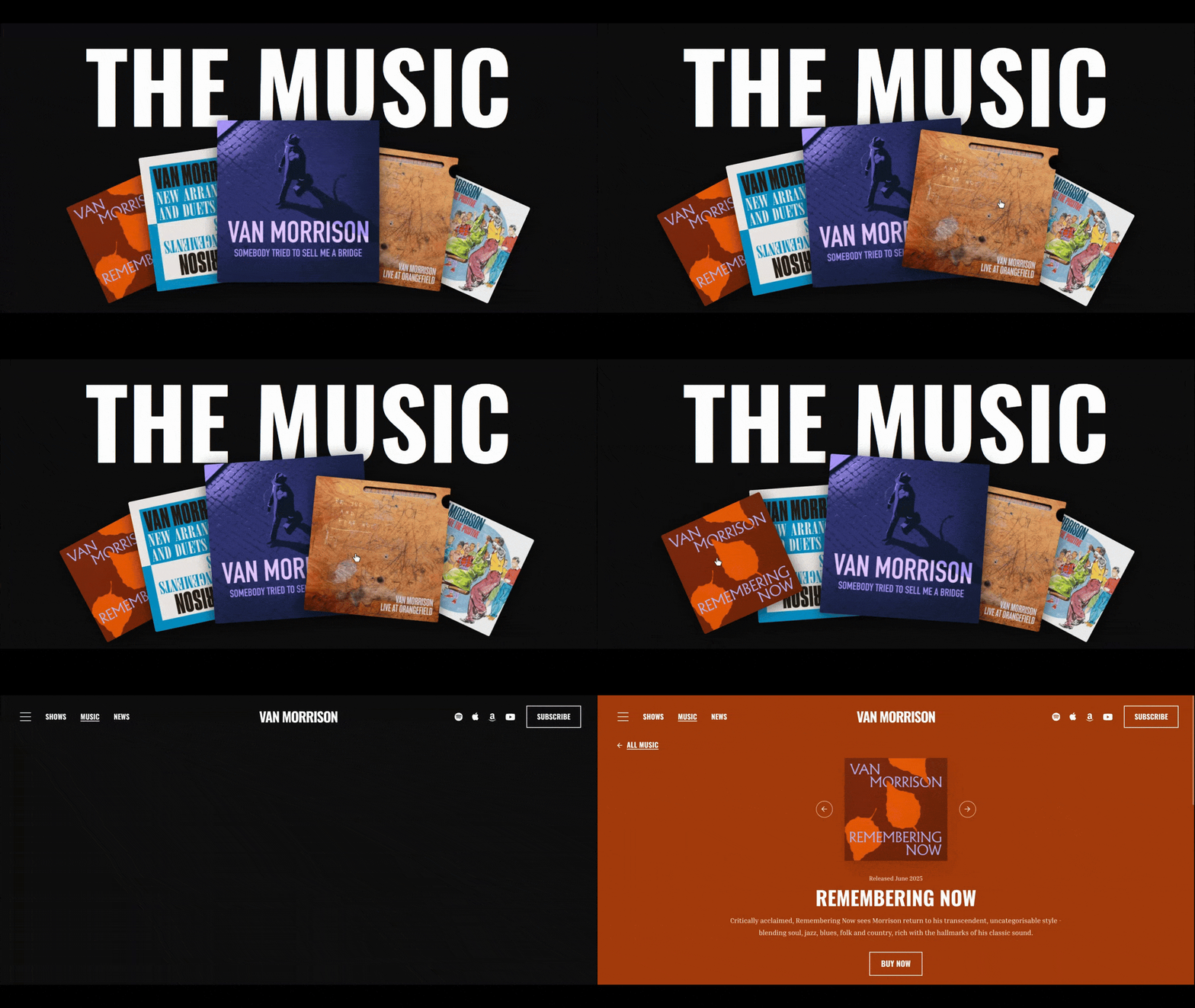
There are five overlapping album covers. When the user hovers over each, they move into the foreground.
While it doesn’t exactly simulate the feeling of flipping through albums, it has a similar effect. It’s a cool way to digitize the experience of perusing an artist’s work and it brings attention to the albums and corresponding page links where they can buy them.
This is a good example of a brand deciding what its top priority is (i.e., selling albums) and then using interaction design to make it the most interesting section on the page.
I think some of the smallest interactions can have the biggest impacts. One website I think demonstrates this well is Leil Saunas.
The homepage has quite a number of interactions built into it, but they’re all fairly small. The one that I think has the biggest impact, however, is the sauna interior reveal, which you can see here:
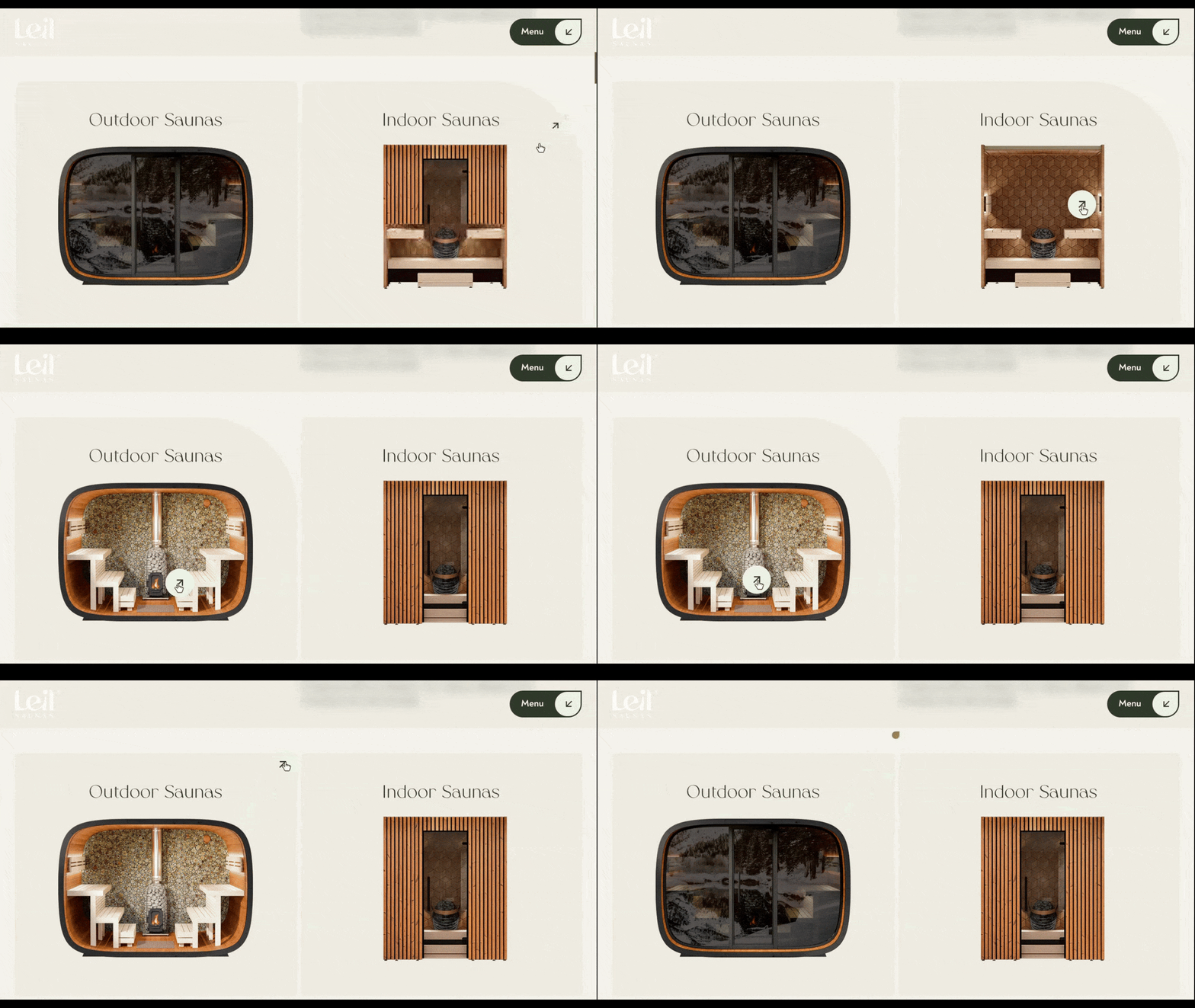
To me, this is akin to hovering over a product image on an ecommerce search page and an alternate view of the product gets revealed. In this case, though, the hover lifts away the exterior window/door to show prospective customers what the inside of each sauna looks like.
When scrolling through the page, the user might not even expect this section to be interactive, which also contributes to why it’s much more engaging that other interactions on this page. At first glance, they look like images of the saunas.
However, once they notice that the exterior lifts in one image, they’ll likely feel compelled to expose the other. And if that piques their interest, they can click on either image to visit the corresponding information page.
We’ve all seen the more common ways in which companies present their portfolios:
These formats are frequently used because they’re effective. They allow a brand to take a bunch of portfolio examples and present them in a visually pleasing layout. That said, most of these layouts require nothing more than a passive viewing of them (with the exception of the sliders and carousels unless they’re set to auto-rotate).
That’s why I think Elephant Skin’s homepage project portfolio is interesting:
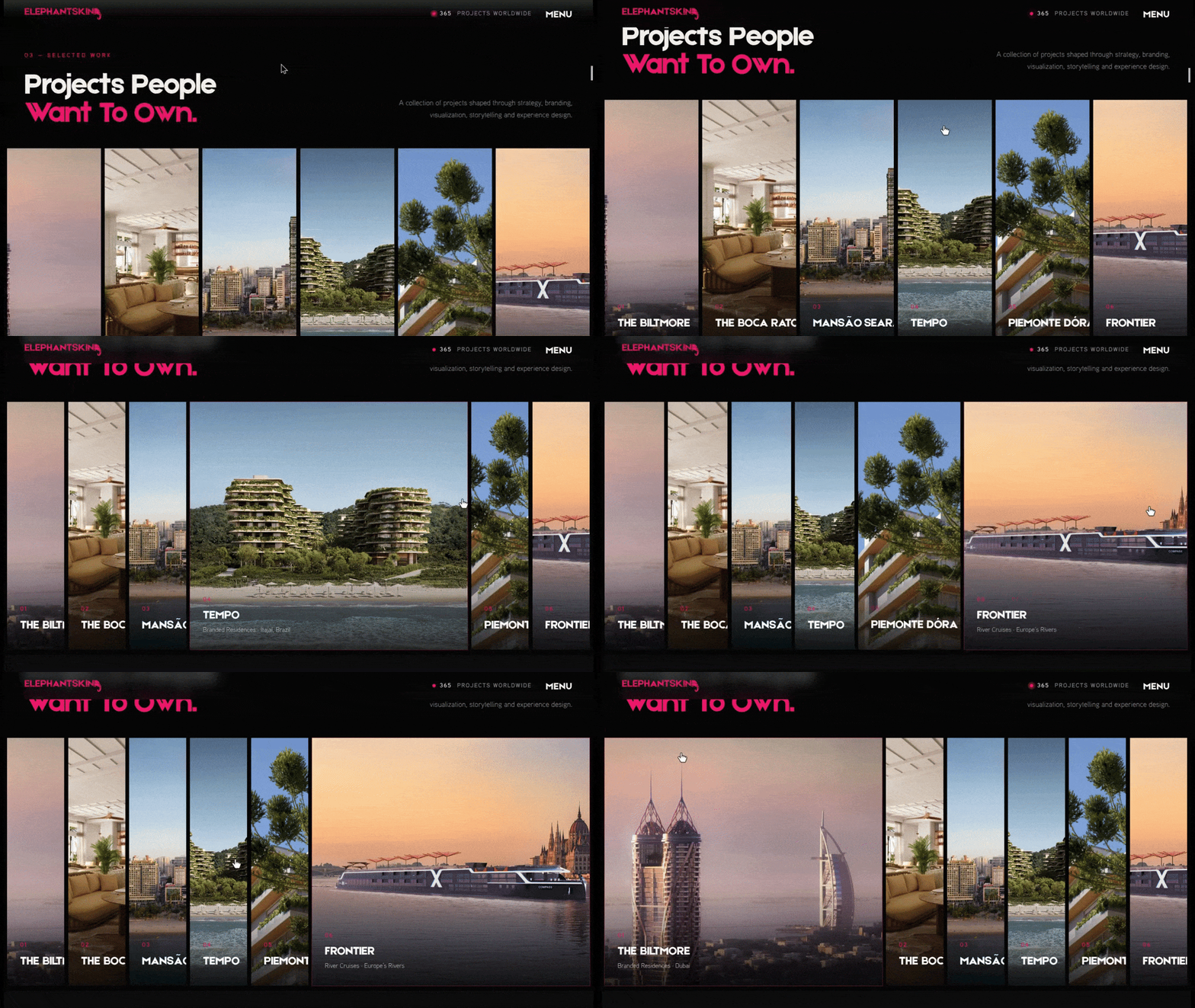
Similar to Leil Sauna, the design of this portfolio section forces users to take notice. Because no matter where their cursor falls as they scroll, it’s going to hover over one of the images in this full-width section. And when that happens, the image pops out, showing the full view along with some details about the project. The user can then click on the image to visit the full project page.
Not only is this interactive design effective because it gets users to stop and notice. It’s also very space-efficient. So, if you’re looking for a way to show off highlights from your portfolio and want to move away from the typical image grids or resource-intensive sliders, this would be a good alternative.
I’m not usually a fan of scroll-controlled interfaces. While it’s neat to see a visual landscape unfold as you scroll down the page, I find that these full-page interactions are often slow to load and feel buggy when you try to click anything. What’s more, the scroll-triggered animation often lends nothing to the experience aside from a cool ambiance.
That said, I ran across this website for the fictional FS 60P watch and thought it was a great example of how to use scroll control in a meaningful way without compromising page performance.
Initially, the watch moves in a push-pull direction with the user’s mouse. Once they start to scroll, the watch spins around to show off the front and back of the timepiece along with the wristband. At one point you even see the clock pieces separate.
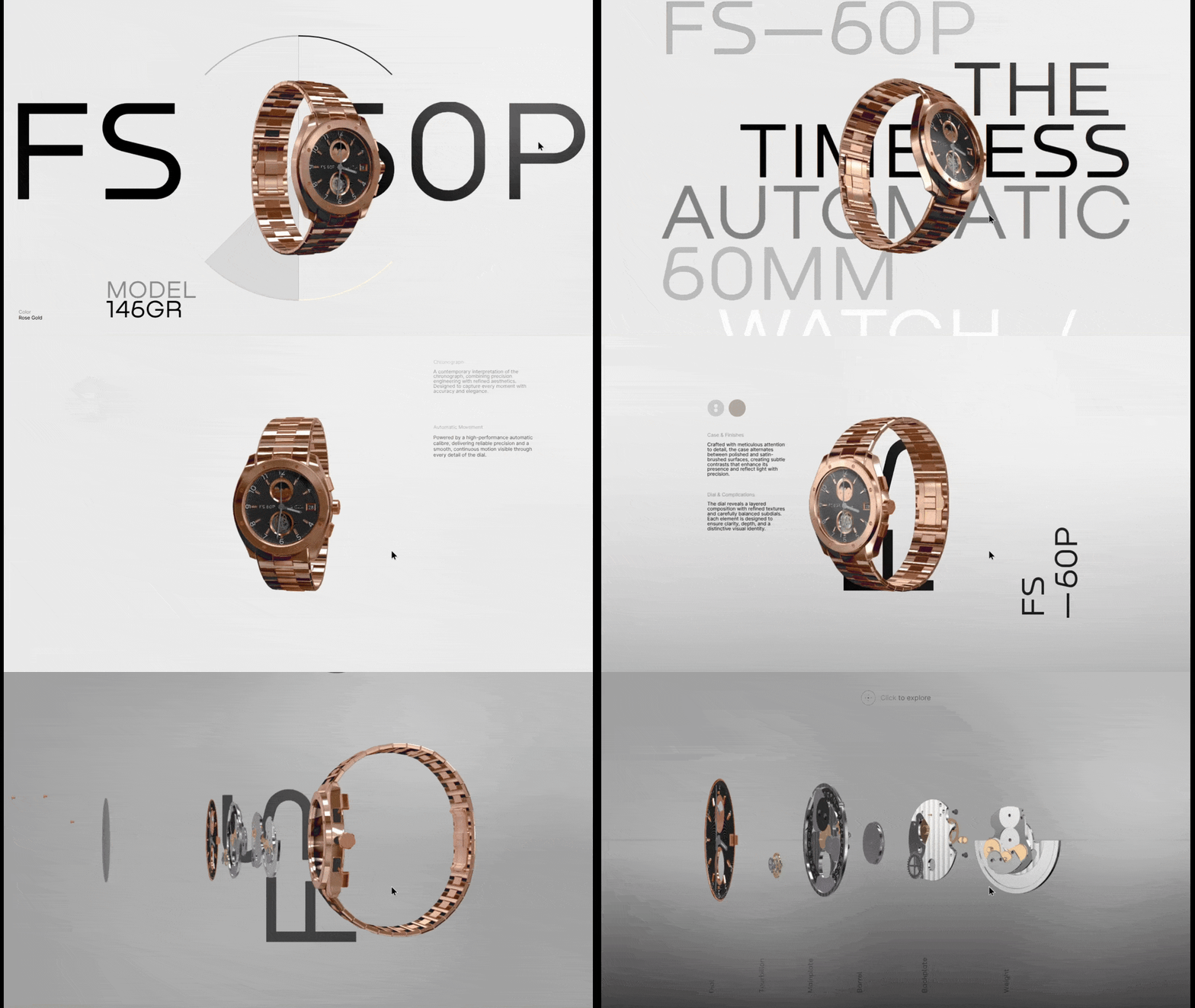
Although this video is sped up, you can see how smooth the scrolling and product reveal experience is. I think by keeping the background very simple and the content minimal, this allows the page performance to stay high.
If you’re building a website for a brand that sells a small handful of products or just one product with a few variations (like this one), a scroll-based interaction is a nice choice. You can see here how it allows prospective customers to view the watch in 3D and from all angles. This can be a huge competitive advantage when trying to sell a product like this one online.
There’s actually a lot of interactivity on the homepage for Sunbeam Bagels. You can see in this video how the button hover state change and the bagel-drop button in the bottom-left corner look:
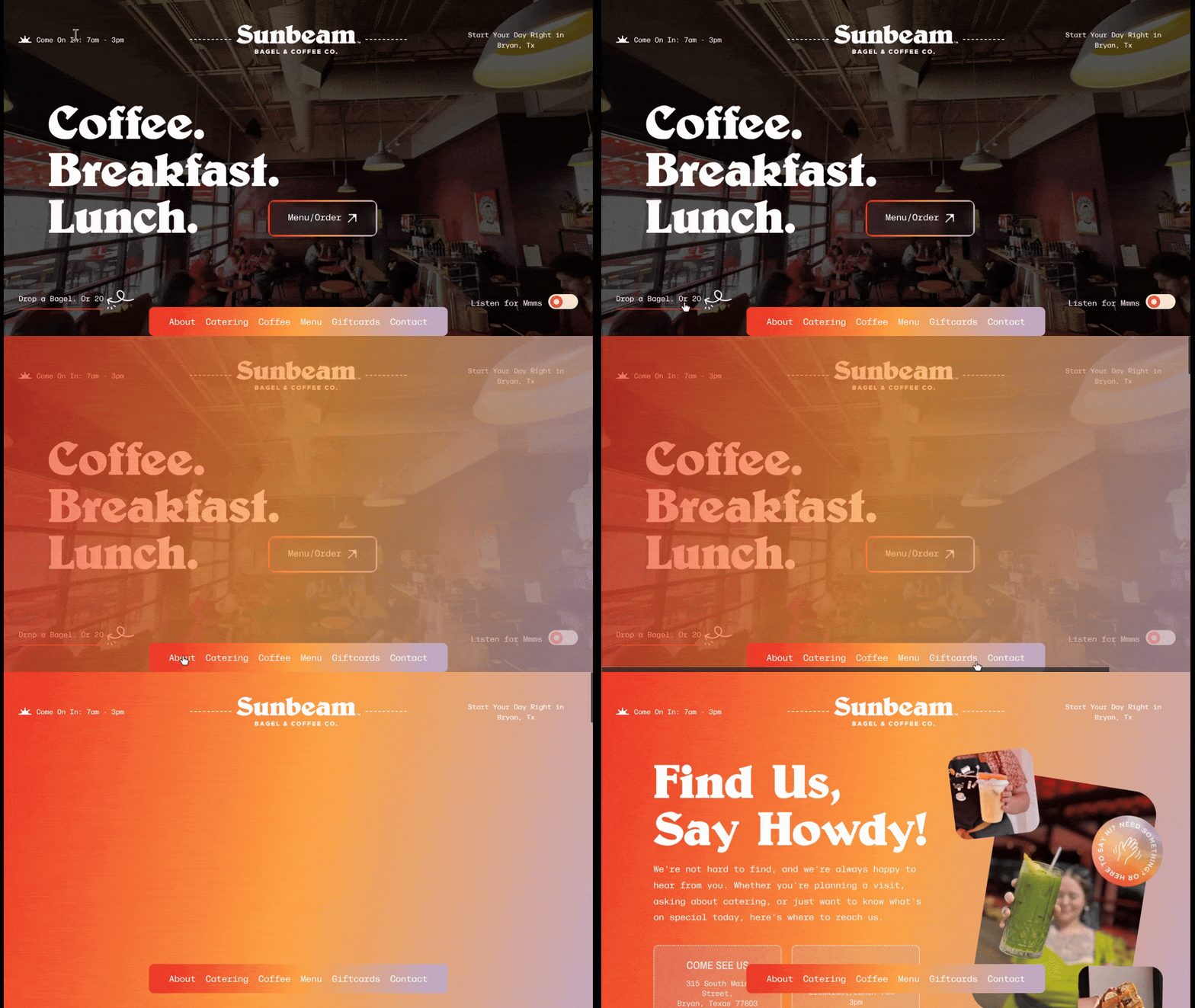
You can also see how an orange-purple gradient filter falls over the entire screen when a user interacts with the bottom navigation. The filter is also pretty heavy on the opacity, so users are going to have a hard time trying to read anything on the page while it’s activated.
That’s why I think this is a meaningful form of interaction design.
Usually, when someone hovers over a navigation link, something changes. Sometimes it’s the font color. Other times an underline appears beneath it.
In this case, those effects extend beyond the navigation bar to the rest of the page. This isn’t merely about applying the brand color to the page. It’s about helping users focus on the task at hand instead of being distracted by what’s on the current page.
I also like this interaction because it straddles the line between the typical header navigation experience and the full pop-out menu experience which has grown in popularity.
So, what makes these interaction design examples so effective? For the most part, you can see how the designers applied interactivity to the most important aspect of each experience.
Van Morrison’s album covers push people to the album purchase page, for instance. Chobani search shows customers products that match their preferences. And Sunbeam Bagels effectively hides the page content so the user can focus on discovering other content on the site.
By attaching your interactions to your website’s goals, they become meaningful. And by creating an experience that perhaps deviates from what users usually find on other websites, you’ll make them more memorable, too.
I tried to buy a road bike. Six major brand websites later, I understood exactly why B2B and manufacturing companies are losing customers online.
Continue reading...
Interaction design serves two purposes.
The first is to create an interface that’s usable. Clickable components like buttons, for instance, come alive (i.e., change appearance) when hovered over. This lets users know where and what to engage with.
The other is to create an interface and experience that’s engaging. Carousels and sliders, for example, often require the user to click or pull on the components to make them move. This asks users to pause for a few moments and pay attention to the content.
In both cases, the interface responds to the user, which can create a more memorable experience for them. But do interactive components always need to be meaningful? In other words, does the interaction need to take the user deeper into their journey with the brand? Or can it be there just for the purposes of entertaining or wowing them?
While interaction design can be satisfying to engage with, it does consume some of the precious time we have with our users. And knowing how short their attention spans are, we really can’t afford to waste their time with meaningless content or experiences.
So, the answer to my original question is: “Yes, interaction design always has to be meaningful.” That said, it doesn’t have to be relegated only to buttons and other small clickable components in your interface. Let’s have a look at some examples.
Examples of Interactive Components That Add Meaning to the Experience
Let’s go beyond clickable buttons and blocks. Here are some interesting ways designers infuse their webpages with meaningful interactivity:
Chobani On-page Search
Search is a valuable UI component on ecommerce and other product-based websites. The more products and variations you have, the more important it is to have a smart search bar that helps users find what they’re looking for.
Although Chobani has a search icon and bar in the header, it also has a section just below the fold on the homepage that does something similar. I’d argue this on-page search component is better, as it only shows product results instead of pages, posts, news and recipes.
Here’s how it works:
As users type into the “Type something…” field, the search bar auto-populates with matching queries. When clicked, matching product images and names appear below.
This interactive search experience is a great way to show off the brand’s comprehensive product offering. It also can help users discover more products without having to sift through the various category pages in the navigation.
Van Morrison Album Covers
The official website for Van Morrison contains the usual basic website interactivity—like button state changes and a pop-out menu. As a musician, this makes sense as it allows the videos of his music to take center stage and makes the rest of the information easy to focus on and read.
That said, there are two areas of the homepage that are interactive. And it makes total sense why the designer chose to animate them.
Here’s how they work:
There are five overlapping album covers. When the user hovers over each, they move into the foreground.
While it doesn’t exactly simulate the feeling of flipping through albums, it has a similar effect. It’s a cool way to digitize the experience of perusing an artist’s work and it brings attention to the albums and corresponding page links where they can buy them.
This is a good example of a brand deciding what its top priority is (i.e., selling albums) and then using interaction design to make it the most interesting section on the page.
Leil Saunas’s Product Reveal
I think some of the smallest interactions can have the biggest impacts. One website I think demonstrates this well is Leil Saunas.
The homepage has quite a number of interactions built into it, but they’re all fairly small. The one that I think has the biggest impact, however, is the sauna interior reveal, which you can see here:
To me, this is akin to hovering over a product image on an ecommerce search page and an alternate view of the product gets revealed. In this case, though, the hover lifts away the exterior window/door to show prospective customers what the inside of each sauna looks like.
When scrolling through the page, the user might not even expect this section to be interactive, which also contributes to why it’s much more engaging that other interactions on this page. At first glance, they look like images of the saunas.
However, once they notice that the exterior lifts in one image, they’ll likely feel compelled to expose the other. And if that piques their interest, they can click on either image to visit the corresponding information page.
Elephant Skin Portfolio
We’ve all seen the more common ways in which companies present their portfolios:
- Image gallery or grid
- Masonry grid
- Image sliders or carousels
- Full-width section with an image on one side and description on the other
These formats are frequently used because they’re effective. They allow a brand to take a bunch of portfolio examples and present them in a visually pleasing layout. That said, most of these layouts require nothing more than a passive viewing of them (with the exception of the sliders and carousels unless they’re set to auto-rotate).
That’s why I think Elephant Skin’s homepage project portfolio is interesting:
Similar to Leil Sauna, the design of this portfolio section forces users to take notice. Because no matter where their cursor falls as they scroll, it’s going to hover over one of the images in this full-width section. And when that happens, the image pops out, showing the full view along with some details about the project. The user can then click on the image to visit the full project page.
Not only is this interactive design effective because it gets users to stop and notice. It’s also very space-efficient. So, if you’re looking for a way to show off highlights from your portfolio and want to move away from the typical image grids or resource-intensive sliders, this would be a good alternative.
FS 60P Rotating Watch
I’m not usually a fan of scroll-controlled interfaces. While it’s neat to see a visual landscape unfold as you scroll down the page, I find that these full-page interactions are often slow to load and feel buggy when you try to click anything. What’s more, the scroll-triggered animation often lends nothing to the experience aside from a cool ambiance.
That said, I ran across this website for the fictional FS 60P watch and thought it was a great example of how to use scroll control in a meaningful way without compromising page performance.
Initially, the watch moves in a push-pull direction with the user’s mouse. Once they start to scroll, the watch spins around to show off the front and back of the timepiece along with the wristband. At one point you even see the clock pieces separate.
Although this video is sped up, you can see how smooth the scrolling and product reveal experience is. I think by keeping the background very simple and the content minimal, this allows the page performance to stay high.
If you’re building a website for a brand that sells a small handful of products or just one product with a few variations (like this one), a scroll-based interaction is a nice choice. You can see here how it allows prospective customers to view the watch in 3D and from all angles. This can be a huge competitive advantage when trying to sell a product like this one online.
Sunbeam Bagels Navigation
There’s actually a lot of interactivity on the homepage for Sunbeam Bagels. You can see in this video how the button hover state change and the bagel-drop button in the bottom-left corner look:
You can also see how an orange-purple gradient filter falls over the entire screen when a user interacts with the bottom navigation. The filter is also pretty heavy on the opacity, so users are going to have a hard time trying to read anything on the page while it’s activated.
That’s why I think this is a meaningful form of interaction design.
Usually, when someone hovers over a navigation link, something changes. Sometimes it’s the font color. Other times an underline appears beneath it.
In this case, those effects extend beyond the navigation bar to the rest of the page. This isn’t merely about applying the brand color to the page. It’s about helping users focus on the task at hand instead of being distracted by what’s on the current page.
I also like this interaction because it straddles the line between the typical header navigation experience and the full pop-out menu experience which has grown in popularity.
Wrapping Up
So, what makes these interaction design examples so effective? For the most part, you can see how the designers applied interactivity to the most important aspect of each experience.
Van Morrison’s album covers push people to the album purchase page, for instance. Chobani search shows customers products that match their preferences. And Sunbeam Bagels effectively hides the page content so the user can focus on discovering other content on the site.
By attaching your interactions to your website’s goals, they become meaningful. And by creating an experience that perhaps deviates from what users usually find on other websites, you’ll make them more memorable, too.
Why Manufacturing Websites Fail Their Buyers
I tried to buy a road bike. Six major brand websites later, I understood exactly why B2B and manufacturing companies are losing customers online.
Continue reading...