Question TAPI: Register TapiEventInterface

Hi everybody,

OE12.8, Win10 x64

Still struggeling with TAPI. Now I have a C++ code that's definitely working, so I try to translate it to ABL. But I'm stuck with the following code-snippet.

Code:
/////////////////////////////////////////////////////////////////////////////
// RegisterTapiEventInterface(CTAPIEventNotification *pTAPIEventNotification)
/////////////////////////////////////////////////////////////////////////////

HRESULT RegisterTapiEventInterface(CTAPIEventNotification *pTAPIEventNotification)
{
    HRESULT hr = S_OK;
    IConnectionPointContainer *pCPC = NULL;
    IConnectionPoint *pCP = NULL;

    // Assuming gpTapi is a valid ITTAPI* instance
    hr = gpTapi->QueryInterface(IID_IConnectionPointContainer, (void **)&pCPC);
    if (SUCCEEDED(hr)) {
        hr = pCPC->FindConnectionPoint(IID_ITTAPIEventNotification, &pCP);
        pCPC->Release();
    }
    if (SUCCEEDED(hr)) {
        // Advise the connection point, receiving a cookie if necessary
        hr = pCP->Advise(pTAPIEventNotification, &g_dwCookie);
        pCP->Release();
    }
    return hr;
}

Could somebody help please ?

TIA, Wolf
 
AI says to write an .NET Wrapper and then consume the .NET Wrapper and subscribe to the events.
 
AI says to write an .NET Wrapper and then consume the .NET Wrapper and subscribe to the events.
I already played around with AI for 2 days, you get a lot of "possible solutions" but none of them works, sometimes the answers are definitely wrong. AI sometimes proposes to use "ENABLE-EVENTS", in other answers it says something like its not possible at all to use TAPI3 directly from Openedge. So I gave up with AI and want to use the C++ code, because I definitely know that this code works.

Have already read about this .NET Wrapper, but this I understand even less than transforming a C++ code to ABL.
 
Agree about AI giving a lot of possible solutions as when I tried doing conversations from C++ to C#/VB.NET the solutions were certainly not the same. Progress say this regarding TAPI:


I can translate some of the code snippet and if any help this is what I have come up with but it is purely guess work - especially the GUID values - as there are workings I have just never accounted before:

Code:
FUNCTION RegisterTapiEventInterface RETURNS INTEGER (pTAPIEventNotification AS ITTAPIEventNotification):
   DEFINE VARIABLE hr AS INTEGER NO-UNDO.
   DEFINE VARIABLE pCPC AS System.Runtime.InteropServices.ComTypes.IConnectionPointContainer NO-UNDO.
   DEFINE VARIABLE pCP AS System.Runtime.InteropServices.ComTypes.IConnectionPoint NO-UNDO.

   // Assuming gpTapi is a valid ITTAPI* instance
   hr = gpTapi:QueryInterface(GetType(System.Runtime.InteropServices.ComTypes.IConnectionPointContainer):GUID, pCPC).
   IF hr >= 0 THEN DO:  // SUCCEEDED(hr)
      hr = pCPC:FindConnectionPoint(GetType(ITTAPIEventNotification):GUID, pCP).
      // One translation suggested pCP = pCPC:FindConnectionPoint(NEW System.Guid:NewGuid(IID_ITTAPIEventNotification)).
      System.Runtime.InteropServices.Marshal:ReleaseComObject(pCPC).
   END.
   IF hr >= 0 THEN DO:  // SUCCEEDED(hr)
      // Advise the connection point, receiving a cookie if necessary
      hr = pCP:Advise(pTAPIEventNotification, g_dwCookie).
      System.Runtime.InteropServices.Marshal:ReleaseComObject(pCPC).
   END.

   RETURN hr.
END FUNCTION.

Regarding a .NET Wrapper. In C++ create a .NET DLL, add it to assemblies.xml and reference the RegisterTapiEventInterface function as you would any other .NET component method in Progress.

Another option is to create a standard external DLL in C++ and call it in Progress using something similar to:

Code:
PROCEDURE RegisterTapiEventInterface EXTERNAL "C:\Tapi.dll" CDECL:
   DEFINE INPUT PARAMETER pTAPIEventNotification AS ITTAPIEventNotification NO-UNDO.
   DEFINE OUTPUT PARAMETER pHr AS INTEGER NO-UNDO.
 END.

DEFINE VARIABLE hr AS INTEGER NO-UNDO.

RUN RegisterTapiEventInterface (INPUT TAPIEventNotification,
                                OUTPUT hr).

MESSAGE hr VIEW-AS ALERT-BOX INFO BUTTONS OK.
 
hr = gpTapi:QueryInterface(GetType(System.Runtime.InteropServices.ComTypes.IConnectionPointContainer):GUID, pCPC).
this statement throws compile-errors 247/198 "unable to understand after....".
AI-Answer: The OpenEdge compiler fails on this line because the ABL GET-TYPE() function cannot extract a :GUID property directly from an interface or type reference.

so I tried...
Code:
hr = chTAPI:QueryInterface("~{B196B284-BAB4-101A-B69C-00AA00341D07~}", pCPC).
...where {B196B284-BAB4-101A-B69C-00AA00341D07} is the GUID of "ConnectionPointContainers".

this statement throws another compile-error: "openedge cannot pass user defined objects to com. (12899)"
AI-Answer: Error 12899 occurs because the Progress OpenEdge Advanced Business Language (ABL) Virtual Machine (AVM) cannot pass user-defined object references (Object-Oriented ABL class instances) directly to external COM/ActiveX objects. The COM interface standard does not recognize or support native OpenEdge object types. (AI-Answer).

So I guess what I want to do is just not possible with ABL.

Thanks for your help Osborne !
 
I've prompted AI to write a C# .NET application that acts as a broker between OpenEdge and the TAPI layer using sockets. The application is running, but I don't have any TAPI drivers installed on my PC yet. What TAPI driver are you using?
 
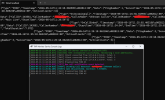
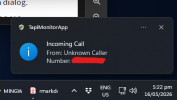
I've got the prototype working. .NET C# application running in the system tray. It detects an Incoming call and it publishes the details to a TCP socket.

Just need to write a Progress ABL application which will passively waits for incoming activity for the socket connection.

1778887918229.png

Fun Fact. I used the TCP port number 1471 as it's used by British Telcom. "It's free to use 1471 to find out the last number that called."
 
Last edited:
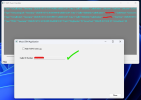
I've got the Caller Number trigger an event process working.
Incoming call triggers the TAPI Events and publish the event data via sockers.

1778895377570.png
1778916891555.png


Code:
+---------------------------------------------------------------+
|                     Windows Operating System                  |
|                                                               |
|   +----------------------+     +----------------------------+ |
|   | Telephony Hardware  |<--->|  TAPI 3.0 Subsystem        | |
|   | (PBX, Modem, VoIP)  |     |  (COM Interfaces)          | |
|   +----------------------+     +----------------------------+ |
|                                                               |
+------------------------------|--------------------------------+
                               |
                               v
+---------------------------------------------------------------+
|         TAPI Monitor System Tray Application (WinForms)       |
|                                                               |
|  +----------------------+     +-----------------------------+ |
|  | TAPI Event Listener |---->| Event Processor             | |
|  +----------------------+     +-----------------------------+ |
|                               | - Normalizes event data     | |
|                               | - Builds JSON payloads      | |
|                               +-----------------------------+ |
|                                                               |
|  +----------------------+     +-----------------------------+ |
|  | TCP Socket Server   |<----| Broadcast Manager           | |
|  | (localhost:1471)    |     | - Sends JSON to all clients | |
|  +----------------------+     +-----------------------------+ |
|                                                               |
|  +----------------------+                                     |
|  | Logging Window       |                                     |
|  | (Color-coded output) |                                     |
|  +----------------------+                                     |
|                                                               |
+---------------------------------------------------------------+
                               |
                               v
+---------------------------------------------------------------+
|                     Connected TCP Clients                     |
|   (Python, JS, C#, Telnet, ABL etc.) receive JSON events      |
+---------------------------------------------------------------+
 
Last edited:
Sorry for the late response, but things are getting a bit confused here.

The client I work for gave me a contact-person for TAPI-questions, but this person doesn’t take the phone-call. So I called the company directly, just to hear that this person is not longer working there.

Giving me a new contact-person is not possible, because 1st I‘m not the contracting party and 2nd I would need to have a „ticket“, which I can’t open out of the same reason. So I forwarded everything to my client.

Anyway.

What I found out meanwhile is:

  • on the computer I’m working there is a software installed: OIP Tapi Service Provider
  • Googeling with this information takes me to „Mitel TAPI-driver – TAPI Call“
Does this answer your question ?
 
I've been testing this code and it's working quite well because it's all event driven. OpenEdge has always had limitations when it comes to event handlers because is simple can't do it. OpenEdge can subscribe to events if the .DLL allow its. This is why you have to create wrappers .dll assemblies.

I give you two GitHub repos. TAPI Bridge is the application that sits in your application tray and can beconfigure to automatically start on windows startup and a log view screen. Binarys are here: TAPIMonitor/bin/Release/net8.0-windows at main · Jimbobnz/TAPIMonitor

The ABL-TAPIMonitorClient repo is the OpenEdge mock application that connects to the localhost loopback socket and waits for events. Try and see if it works for you.

TAPI Bridge (C# .net application )

ABL-TAPIMonitorClient
 
Back
Top