
A
Adam Bertram
Guest
Modernize managed file transfer without disrupting existing partner integrations, workflows or business operations.
Your architecture review board signed off on the file transfer modernization plan a year ago. The mandate was straightforward on paper. Retire the patchwork of scripts and vendor tools, consolidate onto something governed and auditable, and do it without breaking a single partner integration. Then someone pulled the actual inventory. Four hundred active workflows, four different credential stores and scripts with undocumented logic from former employees.
A wholesale rip-and-replace against that backdrop is less a modernization plan than a bet against your own uptime. That’s the real argument for a phased approach to managed file transfer (MFT) modernization.
A phased modernization approach helps organizations reduce migration risk, improve governance, retire technical debt and standardize file movement without disrupting existing business processes.
Start from what you really run, then widen centralized control only as fast as you can verify it. Done right, it also settles the question every architect asks before signing off on a new platform. Does this create another silo to defend, or does it fit the systems you already run?
Every phased modernization plan rests on one architectural decision. Do control and execution live in the same place? Gateway-centric MFT designs route every file through the transfer server itself, so extending coverage to a new region or a new network boundary means standing up another full instance of that server. Progress Automate MFT takes a different structure. A coordinator-agent topology separates a cloud-hosted management console, where you design and govern tasks, from the agents that move data next to where it lives. The console orchestrates from outside the data path.
Unlike gateway-centric and monolithic architectures that route every transfer through a centralized MFT server, Automate MFT separates orchestration from execution, allowing organizations to extend governance without redesigning data paths.
Because execution is decoupled from control, you can point agents at whatever your environment already requires instead of forcing every workflow through one shape:
Self-hosted agents connect outbound only, over HTTPS over TLS, so no inbound firewall path opens to accommodate Automate MFT.
Lock-in deserves a straighter answer than deployment flexibility. Transfers run over standard protocols, so the partner side never learns that anything changed, and endpoint and credential definitions sit in shared libraries you can enumerate. The REST API is the seam your other systems integrate through. Task logic authored in the console is the part that does not travel, so price that rebuild honestly. Then weigh it against the undocumented scripts you are carrying today, which you cannot enumerate at all.
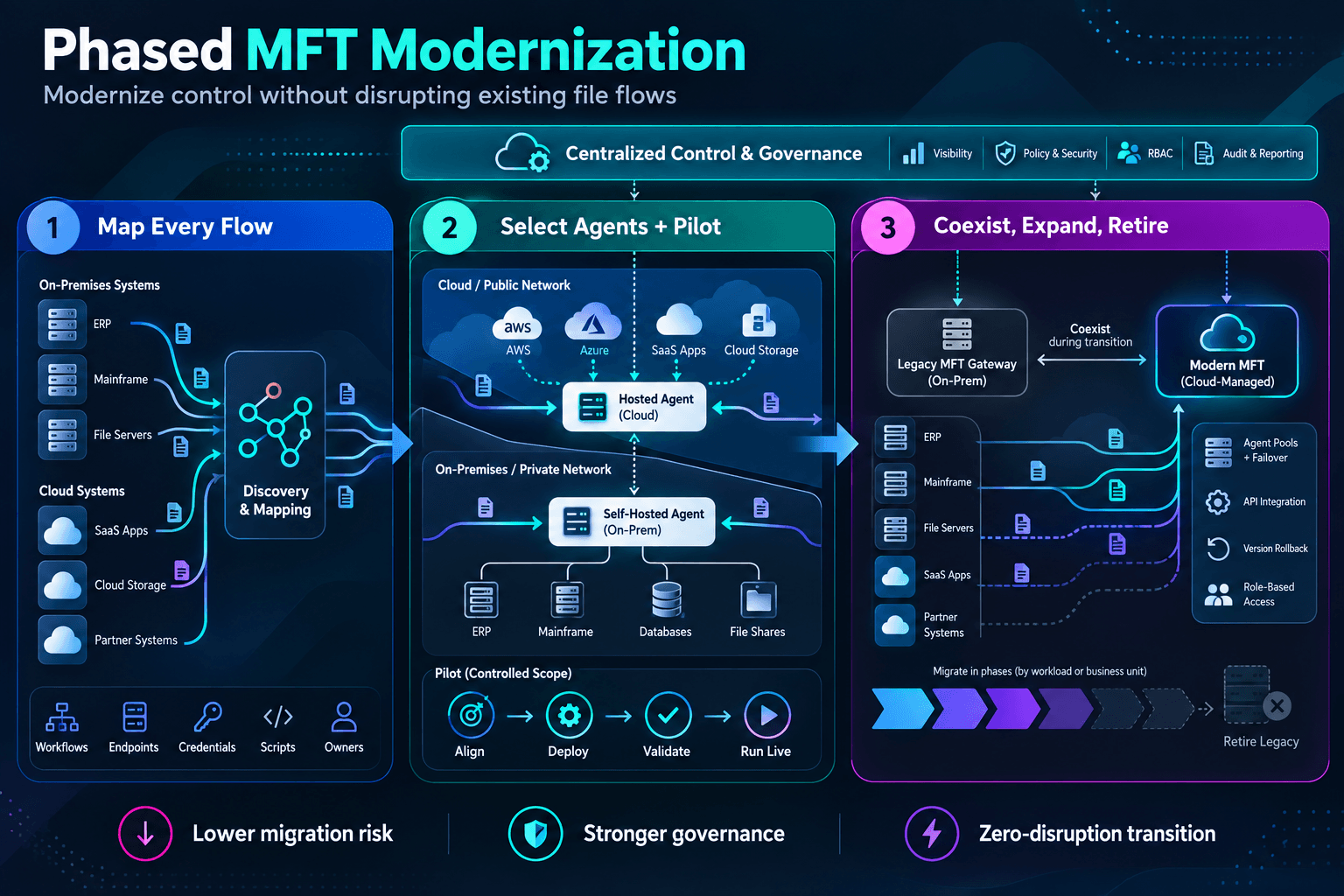
Image generated with AI
Skip the map and you have not avoided the work; you have deferred an outage. The map has five parts:
That last one is the part teams skip, and it’s the one that bites hardest.
Think about this: one workflow moves over cleanly, tests pass, everyone moves on. Three weeks later, a trading partner calls asking why purchase order confirmations stopped arriving. The map missed a post-transfer notification script nobody had documented, because the person who wrote it left two reorganizations ago. Multiply that by four hundred workflows, and you understand why the map decides whether phased modernization succeeds, long before the migration does.
Warning: Production proves a workflow runs. Understanding it takes the map. Map the dependency, the owner and the failure mode before you migrate it.
Once the map is complete, group workflows by pattern. Recurring transfers that hit the same endpoints with the same credentials belong in shared libraries, one definition in place of 40 copies of it.
Agent selection follows directly from the map you built. Put a self-hosted agent behind your firewall for anything touching an internal network share, a local directory or an on-premises Progress MOVEit Transfer server. Cloud-storage-to-cloud-storage work runs on a Progress-hosted agent with zero footprint on your private network. Get either assignment wrong, and you either expose infrastructure you meant to protect or pay for agents you didn’t need.
Pick a small set of high-value, low-risk workflows for the pilot. Leave the most complex partner integration until the pattern holds. Four steps carry it:
Pro Tip: Because self-hosted agents only make outbound connections, your pilot shouldn’t require a single new inbound firewall rule. If a proposed workflow does require one, treat that as a signal to reexamine the design before you migrate it.
Clear those four steps without a firewall change and you have the evidence Phase 3 needs.
Your existing MFT gateway and Automate MFT run side by side while you migrate remaining partners in controlled batches, which is one way to hit zero disruption on a live production dependency without a maintenance window. That coexistence window doubles as evidence. Real traffic runs through Automate MFT before you commit further budget or decommission anything.
As confidence builds, expand control deliberately. Agent pools group multiple self-hosted agents so the platform load-balances across the pool and fails over to another agent in it. That takes the per-site high-availability cluster off the table for most sites. Task versioning keeps your last 200 task versions plus up to 100 named versions you can save, so a bad edit rolls back in one step.
The REST API is the piece that matters most. Your existing orchestration and integration tooling triggers and monitors transfers through it, so file movement shows up in the same dashboards as the rest of your stack.
Your security team will ask about compliance before it asks about anything else. Automate MFT has completed SOC 2 Type 1 and HIPAA audits and includes features designed to support GDPR readiness as of August 2026, including centralized key management, MFA, SSO and role-based access control per workflow. That last control matters most mid-migration, because it helps prevent a half-moved environment from running on two permission models at once.
Decommission legacy nodes as their workflows fully migrate. The calendar follows the migrations. You can defend a phased plan that ends with “everything cut over, nothing broke” at the next review.
Start this quarter with the inventory. Signing anything can wait. Pull the list of every active transfer workflow your team can find and name an owner for each one. Within a week you will know which workflows are safe for a pilot and which need more digging before they go anywhere near a cutover date.
Assess your MFT environment. Schedule a discussion with a Progress specialist to identify migration candidates and build a phased modernization roadmap.
Continue reading...
Your architecture review board signed off on the file transfer modernization plan a year ago. The mandate was straightforward on paper. Retire the patchwork of scripts and vendor tools, consolidate onto something governed and auditable, and do it without breaking a single partner integration. Then someone pulled the actual inventory. Four hundred active workflows, four different credential stores and scripts with undocumented logic from former employees.
A wholesale rip-and-replace against that backdrop is less a modernization plan than a bet against your own uptime. That’s the real argument for a phased approach to managed file transfer (MFT) modernization.
A phased modernization approach helps organizations reduce migration risk, improve governance, retire technical debt and standardize file movement without disrupting existing business processes.
Start from what you really run, then widen centralized control only as fast as you can verify it. Done right, it also settles the question every architect asks before signing off on a new platform. Does this create another silo to defend, or does it fit the systems you already run?
MFT Architecture Considerations for Hybrid Cloud Modernization
Every phased modernization plan rests on one architectural decision. Do control and execution live in the same place? Gateway-centric MFT designs route every file through the transfer server itself, so extending coverage to a new region or a new network boundary means standing up another full instance of that server. Progress Automate MFT takes a different structure. A coordinator-agent topology separates a cloud-hosted management console, where you design and govern tasks, from the agents that move data next to where it lives. The console orchestrates from outside the data path.
Unlike gateway-centric and monolithic architectures that route every transfer through a centralized MFT server, Automate MFT separates orchestration from execution, allowing organizations to extend governance without redesigning data paths.
Because execution is decoupled from control, you can point agents at whatever your environment already requires instead of forcing every workflow through one shape:
| Agent Type | Where It Runs | When You Pick It |
|---|---|---|
| Self-hosted agent | Your own Windows Server or Ubuntu Linux host, behind your firewall | Private endpoints, internal shares and anything not exposed to the internet |
| Progress-hosted agent | Provisioned automatically in the cloud, torn down after the job | Any transfer where every endpoint is publicly reachable, cloud-to-cloud included |
Self-hosted agents connect outbound only, over HTTPS over TLS, so no inbound firewall path opens to accommodate Automate MFT.
Lock-in deserves a straighter answer than deployment flexibility. Transfers run over standard protocols, so the partner side never learns that anything changed, and endpoint and credential definitions sit in shared libraries you can enumerate. The REST API is the seam your other systems integrate through. Task logic authored in the console is the part that does not travel, so price that rebuild honestly. Then weigh it against the undocumented scripts you are carrying today, which you cannot enumerate at all.
Phase 1: Map Every Flow Before You Touch One
Image generated with AI
Skip the map and you have not avoided the work; you have deferred an outage. The map has five parts:
- Every active workflow: scheduled, event-triggered and manual
- Every endpoint and connection
- Every credential and protocol in use: SSH keys and TLS certificates, SFTP and FTPS
- Every ad hoc script or validation step riding along
- The business owner accountable for each
That last one is the part teams skip, and it’s the one that bites hardest.
Think about this: one workflow moves over cleanly, tests pass, everyone moves on. Three weeks later, a trading partner calls asking why purchase order confirmations stopped arriving. The map missed a post-transfer notification script nobody had documented, because the person who wrote it left two reorganizations ago. Multiply that by four hundred workflows, and you understand why the map decides whether phased modernization succeeds, long before the migration does.
Warning: Production proves a workflow runs. Understanding it takes the map. Map the dependency, the owner and the failure mode before you migrate it.
Once the map is complete, group workflows by pattern. Recurring transfers that hit the same endpoints with the same credentials belong in shared libraries, one definition in place of 40 copies of it.
Phase 2: Select Agents, Then Pilot Small
Agent selection follows directly from the map you built. Put a self-hosted agent behind your firewall for anything touching an internal network share, a local directory or an on-premises Progress MOVEit Transfer server. Cloud-storage-to-cloud-storage work runs on a Progress-hosted agent with zero footprint on your private network. Get either assignment wrong, and you either expose infrastructure you meant to protect or pay for agents you didn’t need.
Pick a small set of high-value, low-risk workflows for the pilot. Leave the most complex partner integration until the pattern holds. Four steps carry it:
- Align stakeholders on the DNS and firewall changes involved.
- Install and register the agent, then migrate the task’s logic and schedule into Automate MFT.
- Validate the workflow beginning to end in a non-production environment.
- Run it live while watching for anything the sandbox didn’t catch.
Pro Tip: Because self-hosted agents only make outbound connections, your pilot shouldn’t require a single new inbound firewall rule. If a proposed workflow does require one, treat that as a signal to reexamine the design before you migrate it.
Clear those four steps without a firewall change and you have the evidence Phase 3 needs.
Phase 3: Let Coexistence Buy You Time to Expand Control
Your existing MFT gateway and Automate MFT run side by side while you migrate remaining partners in controlled batches, which is one way to hit zero disruption on a live production dependency without a maintenance window. That coexistence window doubles as evidence. Real traffic runs through Automate MFT before you commit further budget or decommission anything.
As confidence builds, expand control deliberately. Agent pools group multiple self-hosted agents so the platform load-balances across the pool and fails over to another agent in it. That takes the per-site high-availability cluster off the table for most sites. Task versioning keeps your last 200 task versions plus up to 100 named versions you can save, so a bad edit rolls back in one step.
The REST API is the piece that matters most. Your existing orchestration and integration tooling triggers and monitors transfers through it, so file movement shows up in the same dashboards as the rest of your stack.
Your security team will ask about compliance before it asks about anything else. Automate MFT has completed SOC 2 Type 1 and HIPAA audits and includes features designed to support GDPR readiness as of August 2026, including centralized key management, MFA, SSO and role-based access control per workflow. That last control matters most mid-migration, because it helps prevent a half-moved environment from running on two permission models at once.
Decommission legacy nodes as their workflows fully migrate. The calendar follows the migrations. You can defend a phased plan that ends with “everything cut over, nothing broke” at the next review.
Start this quarter with the inventory. Signing anything can wait. Pull the list of every active transfer workflow your team can find and name an owner for each one. Within a week you will know which workflows are safe for a pilot and which need more digging before they go anywhere near a cutover date.
Assess your MFT environment. Schedule a discussion with a Progress specialist to identify migration candidates and build a phased modernization roadmap.
Continue reading...