G
Georgi Balinov
Guest
The State of Agentic Design Tools in Mid-2026
The interesting story in design tooling right now isn’t that AI got better at making mockups. It’s that AI moved into the workspace—the same move coding agents made when they stopped autocompleting lines and started operating inside the repository. Every tool worth paying attention to in 2026 is a bet on that move. Every tool that missed it is just making prettier pictures, faster.
The arc will be familiar to anyone who writes software. AI assistance started as autocomplete, became a chat panel, then became an agent that could read an entire repository and take multi-step actions within it—editing files, running tests, fixing what broke and trying again. What actually changed was never “the AI can write code.” Autocomplete already did a version of that. What changed is that the agent moved into the workspace and started operating there directly, the way a colleague would.
Design tooling repeats that arc in real time, and the workspace it moves into is the canvas. Reviewers have already taken to calling one new entrant the Cursor moment for design—the right instinct, even if it’s a borrowed line. The mistake is reading any of this as “AI generates mockups now.” It’s done that for years. What’s new in 2026 is that the canvas is becoming a surface an agent can read and write, not just paint on.
That shift is dissolving the old handoff between designers and developers, and most of what’s been written about that fact stops there. But “the handoff is dead” is the easy headline. The harder and more useful question is where the source of truth ultimately resides once the handoff disappears: in the design file, in the repository or in the running product itself. That’s not a taxonomy question. It’s the fight that will determine how design and engineering teams get organized for the next several years.
What follows maps who is actually making this move in mid-2026, what separates a real canvas agent from a dressed-up prompt box, and (the part most catalogs skip) what teams should conclude from watching where each tool places its bet.
It helps to set a clear bar before naming names, because the phrase “AI design tool” has been stretched to cover almost anything. A tool earns the description of an agent on the canvas when it combines two things. First, a spatial, directly manipulable canvas—a surface where layout, components and relationships live in two dimensions and can be edited by hand. Second, an agent that takes iterative, multi-step actions within that environment: reasoning over a design system, editing components, layers and tokens, and frequently round-tripping to real code. The contrast is with a single prompt that produces an image you then clean up by hand.
The distinction is the same one that separated early code autocomplete from a coding agent. A floating prompt box that emits a finished mockup is a vending machine: you put a request in, a result drops out, and any refinement is on you. An agent on the canvas is closer to a collaborator working in the same room—it acts on the shared surface, you react, it adjusts, and the loop continues. Figma framed its own move in nearly those terms, describing a deliberate turn away from disconnected, floating prompt boxes toward assistants that live directly on the canvas.
There is a second property that was rare a year ago and is now arriving in shipping products: the canvas as a multiplayer workspace shared by humans and agents, sometimes several agents at once. When multiple agents can work on different parts of the same file in parallel while people watch and steer, the canvas stops being a document and starts to behave like a live production room. That capability is the clearest signal that the category has crossed from “generative feature” into “agentic environment.”
What Doesn’t Qualify (and Why that Matters)
Drawing the boundary clearly is worth a paragraph, because the negative space sharpens the definition. Tools like Uizard, Visily and Relume are useful and popular, but some of these tools are fundamentally one-shot generators—text, sketch or URL goes in, a mockup comes out—bolted onto a manual editor. There is no agent taking iterative action on the canvas. There is a generator and then there is you. Anima sits just outside the line too, as a mature design-to-code converter rather than a canvas an agent operates on. The boundary here is not about quality or usefulness. It is about where the agency lives. The moment a tool stops generating and handing off and starts acting and reacting on the canvas, it crosses into the territory this article is about.
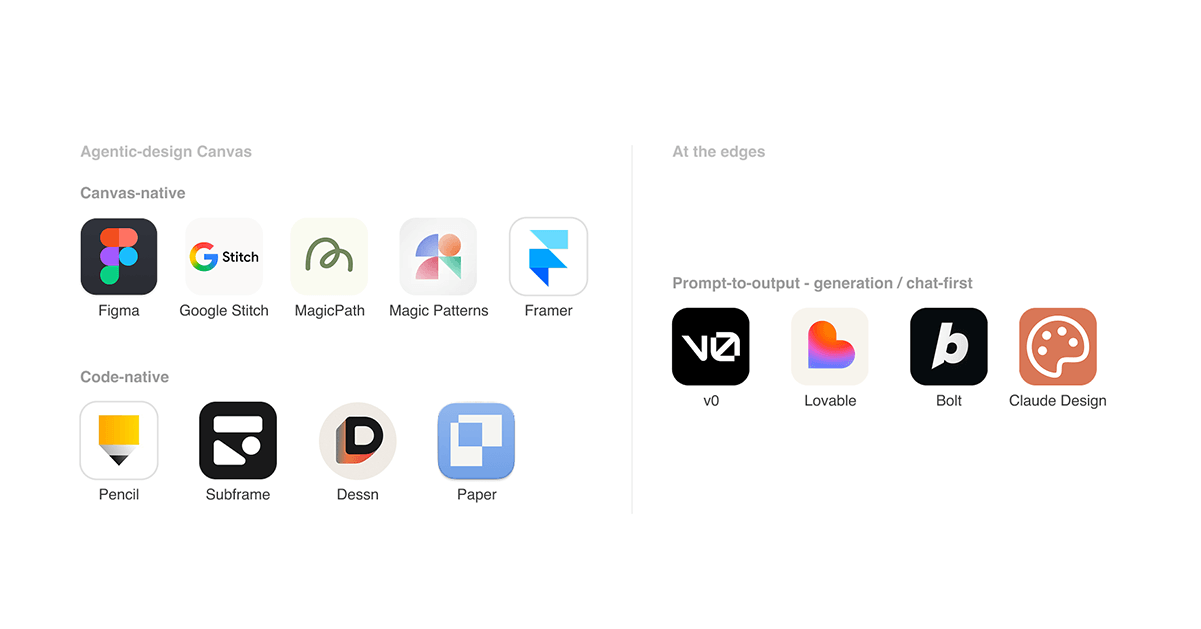
The tools that clear the bar disagree on one important question: where the agent should live. That disagreement turns out to be the most useful way to organize them, because it shapes everything else—who the tool is for, what the source of truth is and how cleanly design and code stay in sync. Two groups have emerged, with a third family of prompt-to-output tools sitting just off to the side.
Canvas-Native: The Agent Works a Visual Design Surface
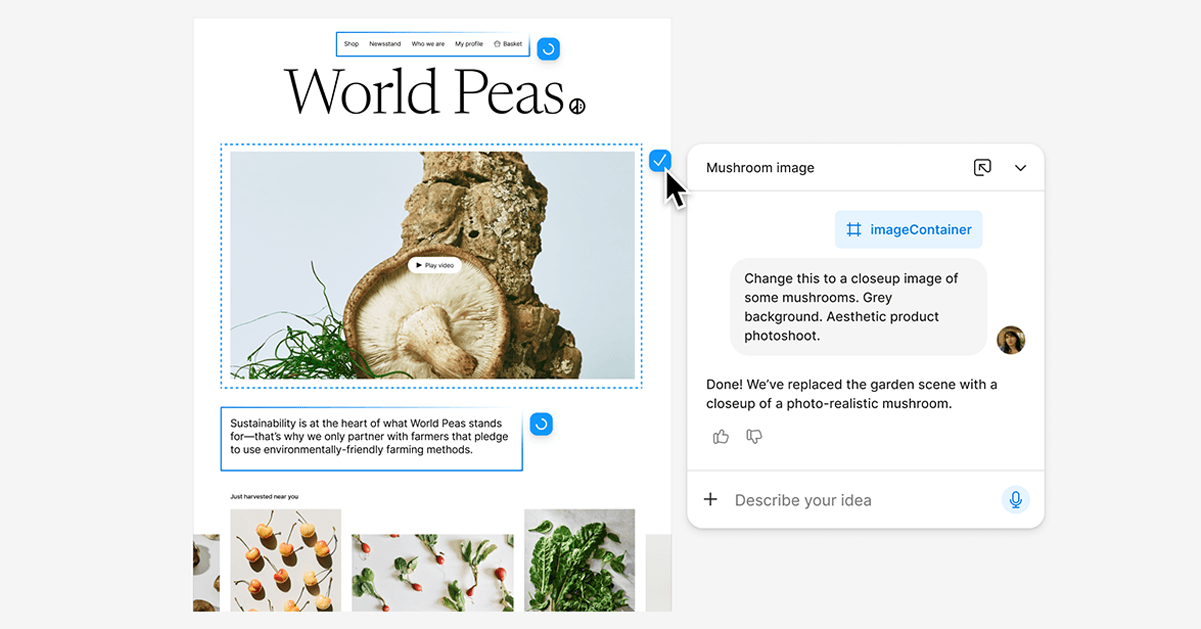
Figma is the anchor of this group, and it moved twice in 2026. In March, it opened its canvas to third-party agents through its Model Context Protocol (MCP) server and a system of “skills”—letting agents create and edit components, apply variables and build designs using a team’s own design system rather than generic output. Then, on May 20, it began rolling out its own first-party agent‚ branded simply as the Figma agent, which lives both on the canvas and in the left rail. Built in partnership with OpenAI and Anthropic, it explores ideas, makes bulk edits across many layers at once and applies a team's design system. It can also apply a team’s design system and turn written feedback into concrete changes, moving fluidly between Figma Design, Figma Make and code. The feature remains in beta and is rolling out gradually to Full-seat users on Professional, Organization and Enterprise plans. During the beta, usage does not consume AI credits, though standard usage applies once it reaches general availability. Around the same time, Figma added “Code to Canvas,” which turns AI-generated code into editable Figma layers, and continued building out Figma Make, its prompt-to-app path. The limitation is a familiar one: the agent is only as good as the file it is handed. Well-structured tokens and components yield clean results. Poorly structured files produce equally poor agent behavior.
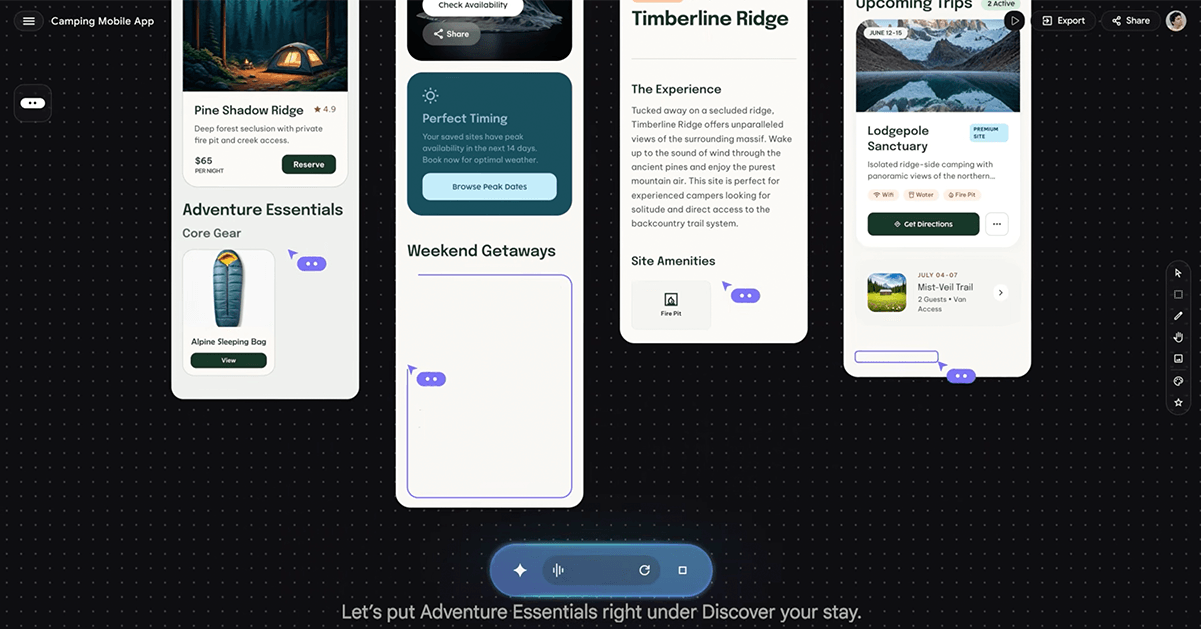
Google Stitch began life as a single-screen generator (the former Galileo AI) and, in its March 2.0 update, became something closer to an AI-native design canvas: an infinite surface with a design agent that reasons across a project’s full history rather than just the last prompt. It also introduced multi-screen generation and voice-driven critique. It exports to Figma and to code, with a direct path into Google’s Firebase ecosystem. Reviewers point to two limitations. Stitch generates from Google’s own models rather than your component library, so output can feel generic, and the smoothest export path pulls you toward Firebase.
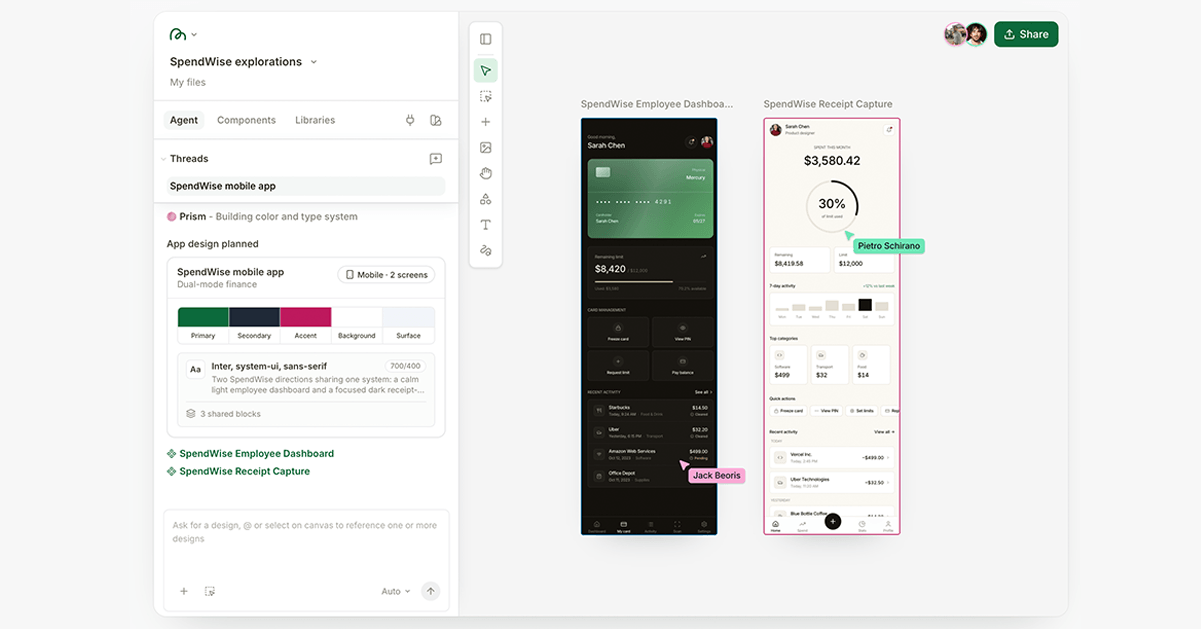
MagicPath is the tool that reviewers have dubbed the “Cursor moment for design<![if !supportAnnotations]>[JH8]<![endif]> <![if !supportAnnotations]>[GB9]<![endif]> .” Built by a designer who previously worked at Meta and Uber, its 2.0 release introduced a real-time multiplayer canvas where humans and AI agents collaborate with visible presence. It’s backed by a rebuilt agentic system designed to support multiple AI agents working in parallel. You can start from a prompt, drop images onto the canvas and generate code from them, or connect a coding agent and go code-to-design. The trade-offs stem largely from the platform’s relative youth. Historically, it has lacked direct Figma export, and its credit-based pricing means that exploratory work can burn through credits quickly.
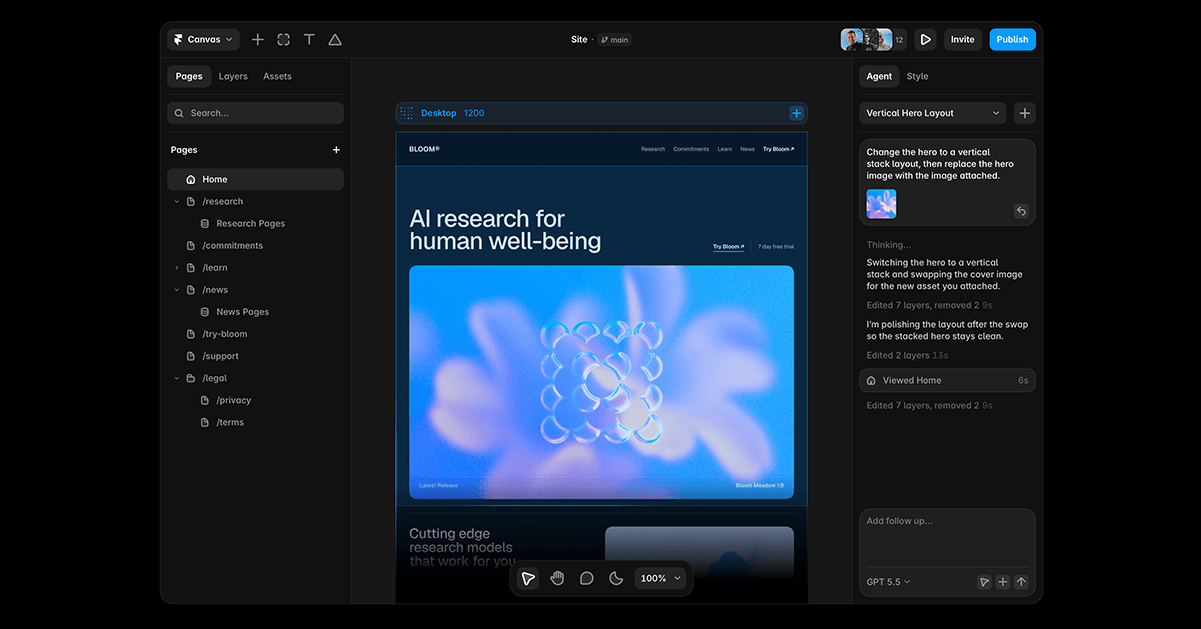
Framer made a similar move on June 16, 2026, with Framer 3.0. Its agents act directly on a live website project—editing pages, components and styles while also updating CMS content and SEO settings as native, editable work rather than generating static mockups. The release also introduced Branching, which allows teams to review and compare an agent’s changes before publishing, along with support for external agents like Claude, Codex and Cursor. Its scope is narrower than the others here (Framer is a website platform, not a general product-design tool), but the underlying premise is similar. As the company’s co-founder put it, the canvas, not a text box, is where design taste actually shows up.
Code-Native: The Canvas Is a Skin Over Real Code—Or the Running Product Itself
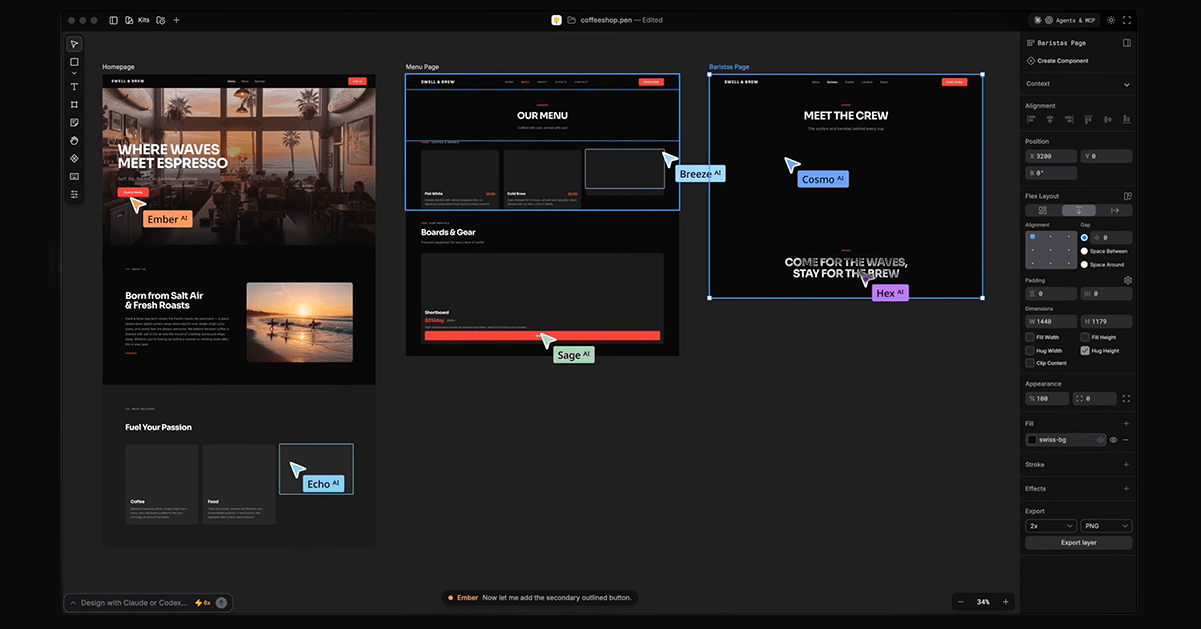
Pencil takes the most distinctive position in this group, and it is the clearest expression of the coding-agent parallel, because it lives inside the IDE. Pencil installs as an extension for VS Code, Cursor and Antigravity, and ships as a desktop app. Its design files—in an open, JSON-based .pen format—sit in your Git repository, right next to the source they describe. That placement changes the relationship between the agent and the canvas. Pencil runs a local MCP server, and tools such as Claude Code, Cursor and Codex connect to it to read and write the canvas files directly. That differs from the more common Figma arrangement, where an agent reads a design file to write code elsewhere. Here, the canvas and the codebase are the same workspace.
The practical consequence shows up in fidelity. Because the agent reads the underlying vector node—seeing, say, a padding value of 1rem—rather than guessing dimensions from a flattened PNG, the resulting code can map more directly onto utility classes and existing components. A typical session reads like a coding session: open a .pen file in Cursor, describe a hero section design, ask the agent to add a three-column feature row, tell it to use your primary color variable for the buttons, then ask it to generate the React for the whole page—and commit the design file and the component together in one changeset. The trade-off is that Pencil remains highly developer-centric, and the UI it produces still needs the same engineering review as any generated code: accessibility, state and data wiring do not come for free.
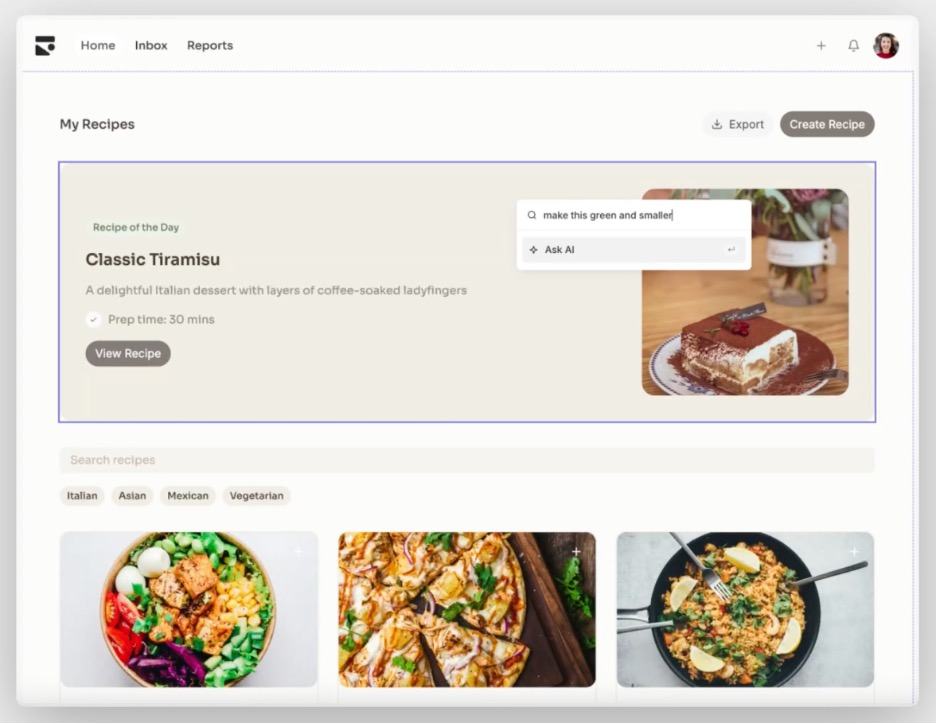
Subframe offers a Figma-like canvas built on code-grade primitives—the elements you drag around are React and Tailwind components with props and variants, rather than vector approximations. You can connect coding agents through MCP and agent skills so the agent can work with your design system and preview generated pages before they are imported into the codebase. Teams can then pull the result in through the CLI. Reviewers frequently describe the appeal as its focus on “production-ready” code and the ability to translate designs into implementation with minimal reinterpretation. The constraints are specific: the canvas is auto-layout-only with a maximum width of around 1280 pixels, so wide-viewport layouts spill into hand-written code, and developer changes made after export are not automatically reflected back into the canvas.
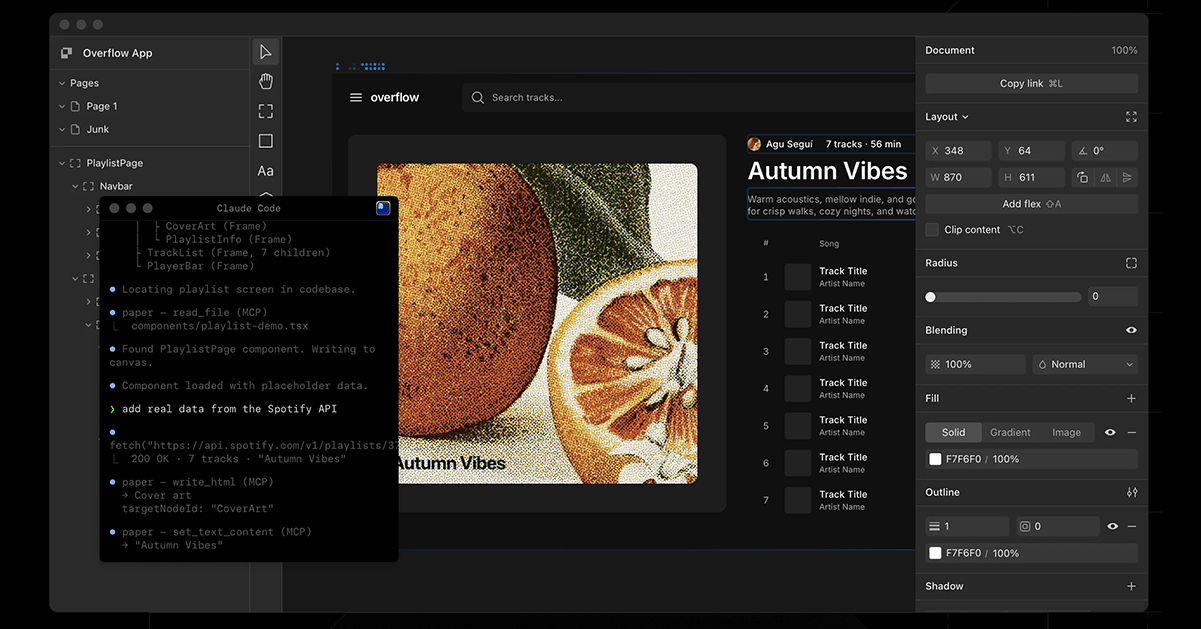
Paper rounds out the group with a connected HTML/CSS canvas. You can pull a running application’s UI onto the canvas, edit it visually and push the changes back into the application as code, with an MCP server that keeps design tokens and components in sync across multiple agents. It is among the newer entrants and currently has a smaller community than more established tools. Its mental model also differs from Figma’s, which can create a learning curve in exchange for tighter code coupling.
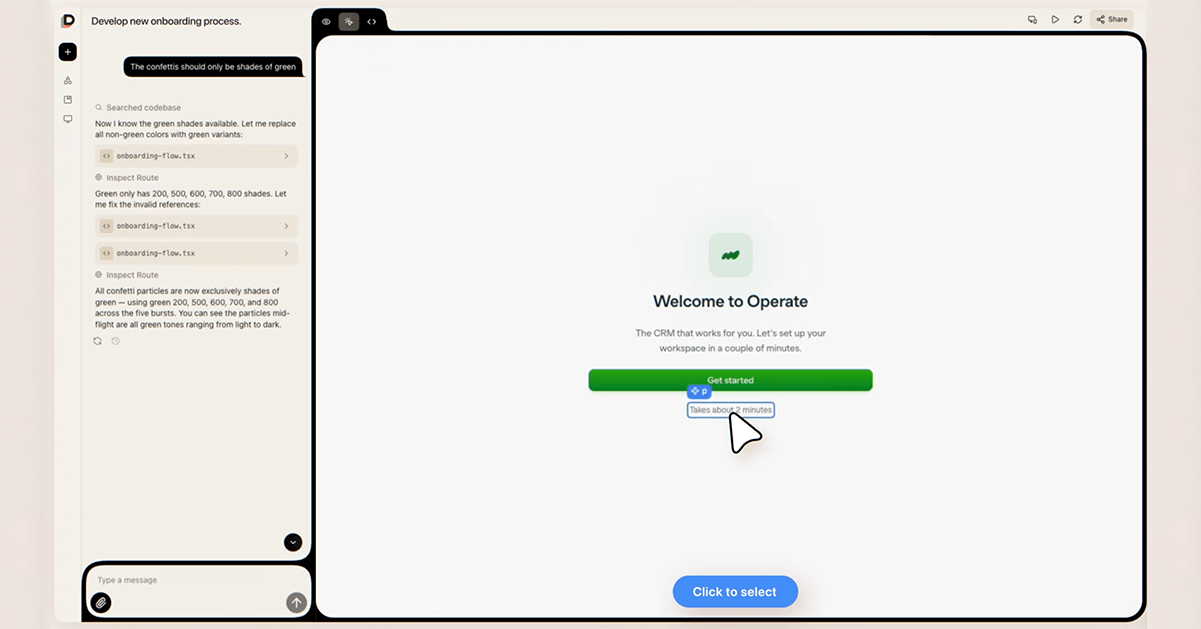
Dessn comes at the same problem from the opposite direction. Where Pencil brings the canvas into the developer’s IDE, Dessn brings the codebase out to the team in the browser. After connecting a repository, Dessn builds a design environment around it and prototypes become live branches of your product. No IDE, no localhost and, pointedly, no MCP. Non-developers can design directly in production against the actual components and styles the application already uses. Its defining choice is that it is read-only by design. Dessn reads your codebase and generates new code on a branch, but never writes back to the repository, with each project sandboxed in its own isolated environment. It targets React web apps, and customers report reusing much of the generated code. The trade-off is that the definition of “canvas” is broadest here. The surface is the running product rather than a design plane, and the round-trip deliberately stops short of committing to your repository.
A Note on the Borderline Cases
Two kinds of tools sit just off to the side.
The first is the prompt-to-output category: generation- or conversation-first tools where users work from prompts and previews rather than a canvas: v0, Lovable, Bolt and Anthropic’s Claude Design among them. Claude Design is one of the more design-focused tools in this category. It ingests a design system and hands off to Claude Code—but it is still prompt-driven, with limited canvas capabilities rather than a canvas-first workspace.
The second is a cluster that is simply too new to judge: dMaya, the open-source Onlook (a self-described “Cursor for designers” that edits live React on an infinite canvas), and the just-funded Noon (a “dual canvas” that works directly on your product code) are all chasing the same code-native canvas idea this article describes, but are early-access or waitlist-gated enough that a verdict today would be premature. They are names to watch as the category fills in.
Group the tools this way and the common thread becomes visible. The shift that matters is not that agents can generate UI—it is that agents can now read and write both design and code, with the design system serving as the shared contract between them. That happens in two directions, and the best tools support both.
In the design-to-code direction, an agent reads a structured design—tokens, component variants, layout constraints—and emits a corresponding implementation. This is the Figma MCP, Subframe and Pencil story. In the code-to-design direction, running code or a live interface becomes editable canvas layers: Figma’s Code to Canvas, Paper pulling live UI onto the surface and Pencil importing existing components back into the file. When both directions work, the design and the code stop being two artifacts that need reconciling and become two views of the same thing. Not every tool closes that loop, and some refuse to on purpose. Dessn reads a team’s production codebase as context and generates new code on a branch, yet by design never writes back to the repository—a useful reminder that “both directions” is a spectrum, not a guarantee.
This is exactly the move coding agents made when they collapsed the write-test-run cycle into a continuous loop. When both the canvas and the repository are surfaces an agent can read, handoff stops being a scheduled event and becomes something that happens continuously in the background, as a property of the workspace itself.
The real argument cuts against the easiest headline of the year: it is tempting to declare the handoff dead, and plenty of commentators have—it was one of the most common design narratives of early 2026. The more accurate and more useful claim is narrower. What is disappearing is the translation-loss step: the part where a designer’s intent degraded as it passed through a static mockup into a developer’s interpretation. Judgment, review and system design are not disappearing. They are moving earlier and becoming more leveraged. The same Figma-to-code workflow that has helped some teams save two weeks of build time has also, in less careful hands, produced hundreds of lines of brittle inline CSS from a poorly structured file. The tool did not change between those two outcomes—the quality of the design system did. The handoff isn’t so much dying as being replaced by a different question entirely—not who hands off to whom, but where the source of truth lives once there’s no handoff left to perform.
This has a concrete implication that the tooling conversation tends to obscure: the design system is no longer optional polish. It is the input an agent reasons over, and its quality directly determines whether agentic tooling accelerates delivery or generates technical debt. Teams that have treated component libraries and token structures as a someday project are discovering they are now the rate-limiting factor. The agents are largely ready. The files, in many cases, are not.
The multiplayer dimension adds a genuinely new set of questions. When several agents and several people can all act on the same canvas at once, the file becomes a live production environment rather than a document someone owns. That is powerful, and it raises issues the field has barely started to work through: how changes get attributed, how they get reviewed and who signs off on what an agent altered while no one was looking.
For designers, the center of gravity shifts from execution toward direction. The time once spent pushing pixels, drawing redlines and writing handoff documentation moves toward judgment, taste and design-system architecture—deciding what to build, curating what the agent produces and keeping the system coherent enough that the agent’s output is good. The file is no longer a picture of the product—it is increasingly the infrastructure the product is built from.
For developers, the work tilts from translating mockups toward reviewing agent-generated UI and wiring it to real state and data. Design files may start appearing in your repository and even inside your IDE, which is a workflow change as much as a tooling one. The design is now something you version, diff and review alongside code.
Choosing one of these tools is also a bet on where the source of truth lives. That makes it a workflow architecture decision, not just a feature comparison. A team that adopts Pencil is committing to the repository as the canonical surface. A team that stays on Figma with MCP is keeping the design file as the source and letting agents translate from it. A team that moves to Subframe or Dessn is betting that code-grade primitives should anchor everything else. The right answer depends on your team’s shape—where designers and engineers already spend their time, how mature your component system is and how much round-trip fidelity you actually need—more than on which tool has the most impressive demo.
For leaders choosing tools, the profiles above collapse into a short set of questions worth asking of any candidate:
And one honest caveat that applies across the whole category: “production-ready” still means “needs review.” Output quality suffers when files are poorly structured, preview quality is uneven, backporting is often unsolved and the agent’s confident-looking result can hide the same bugs any generated code can. The tools are remarkable. They are not yet autonomous.
It is worth remembering how the coding-agent story actually ended, because design is following the same path. Agents did not kill the code editor. They changed what happens inside it. The editor is still there. It is just no longer a place where one person types alone.
The canvas is on the same trajectory. It is not being replaced by a chat box. The tools that tried that are the ones struggling to clear the bar. It is being populated by collaborators, human and agent, all operating on a shared surface that more and more of them can read and write faithfully. Mid-2026 is an inflection point in that shift, not its conclusion. The tools still disagree about where the agent belongs—in the browser, in the IDE or in the conversation. That disagreement is the live debate worth watching, because it is really a debate about what the source of truth should be. That answer will do more to reshape how design and engineering teams are organized over the next few years than any individual feature ship.
The question designers and developers have been asking for the last couple of years—“Can AI design this?”—has mostly been answered, and the answer is yes. The more consequential question is the one this piece has argued for: not whether agents belong on the canvas, but whose canvas—whose source of truth—they end up working on. Teams that treat this as a tooling decision will pick based on demos. Teams that treat it as the workflow-architecture decision it actually is will pick based on where their design system already lives, and will be the ones ready when the next version of these tools ships. If you are evaluating tools in this space, the most useful thing you can do right now isn’t watch another demo. It’s an audit of your design system. Clean components, consistent tokens and well-named layers are not just good hygiene—they are the infrastructure this entire shift runs on.
A note on a fast-moving field: This landscape changes by the week, and any snapshot of it, including this one, begins going stale the moment it’s published. If you think a tool is missing, or you’d categorize one differently than I have, I’d be glad to hear it. Get in touc
Continue reading...
The Cursor Moment for Design
The interesting story in design tooling right now isn’t that AI got better at making mockups. It’s that AI moved into the workspace—the same move coding agents made when they stopped autocompleting lines and started operating inside the repository. Every tool worth paying attention to in 2026 is a bet on that move. Every tool that missed it is just making prettier pictures, faster.
The arc will be familiar to anyone who writes software. AI assistance started as autocomplete, became a chat panel, then became an agent that could read an entire repository and take multi-step actions within it—editing files, running tests, fixing what broke and trying again. What actually changed was never “the AI can write code.” Autocomplete already did a version of that. What changed is that the agent moved into the workspace and started operating there directly, the way a colleague would.
Design tooling repeats that arc in real time, and the workspace it moves into is the canvas. Reviewers have already taken to calling one new entrant the Cursor moment for design—the right instinct, even if it’s a borrowed line. The mistake is reading any of this as “AI generates mockups now.” It’s done that for years. What’s new in 2026 is that the canvas is becoming a surface an agent can read and write, not just paint on.
That shift is dissolving the old handoff between designers and developers, and most of what’s been written about that fact stops there. But “the handoff is dead” is the easy headline. The harder and more useful question is where the source of truth ultimately resides once the handoff disappears: in the design file, in the repository or in the running product itself. That’s not a taxonomy question. It’s the fight that will determine how design and engineering teams get organized for the next several years.
What follows maps who is actually making this move in mid-2026, what separates a real canvas agent from a dressed-up prompt box, and (the part most catalogs skip) what teams should conclude from watching where each tool places its bet.
So, What Counts as “An Agent on the Canvas”?
It helps to set a clear bar before naming names, because the phrase “AI design tool” has been stretched to cover almost anything. A tool earns the description of an agent on the canvas when it combines two things. First, a spatial, directly manipulable canvas—a surface where layout, components and relationships live in two dimensions and can be edited by hand. Second, an agent that takes iterative, multi-step actions within that environment: reasoning over a design system, editing components, layers and tokens, and frequently round-tripping to real code. The contrast is with a single prompt that produces an image you then clean up by hand.
The distinction is the same one that separated early code autocomplete from a coding agent. A floating prompt box that emits a finished mockup is a vending machine: you put a request in, a result drops out, and any refinement is on you. An agent on the canvas is closer to a collaborator working in the same room—it acts on the shared surface, you react, it adjusts, and the loop continues. Figma framed its own move in nearly those terms, describing a deliberate turn away from disconnected, floating prompt boxes toward assistants that live directly on the canvas.
There is a second property that was rare a year ago and is now arriving in shipping products: the canvas as a multiplayer workspace shared by humans and agents, sometimes several agents at once. When multiple agents can work on different parts of the same file in parallel while people watch and steer, the canvas stops being a document and starts to behave like a live production room. That capability is the clearest signal that the category has crossed from “generative feature” into “agentic environment.”
What Doesn’t Qualify (and Why that Matters)
Drawing the boundary clearly is worth a paragraph, because the negative space sharpens the definition. Tools like Uizard, Visily and Relume are useful and popular, but some of these tools are fundamentally one-shot generators—text, sketch or URL goes in, a mockup comes out—bolted onto a manual editor. There is no agent taking iterative action on the canvas. There is a generator and then there is you. Anima sits just outside the line too, as a mature design-to-code converter rather than a canvas an agent operates on. The boundary here is not about quality or usefulness. It is about where the agency lives. The moment a tool stops generating and handing off and starts acting and reacting on the canvas, it crosses into the territory this article is about.
The Landscape, Mapped by Where the Agent Lives
The tools that clear the bar disagree on one important question: where the agent should live. That disagreement turns out to be the most useful way to organize them, because it shapes everything else—who the tool is for, what the source of truth is and how cleanly design and code stay in sync. Two groups have emerged, with a third family of prompt-to-output tools sitting just off to the side.
Canvas-Native: The Agent Works a Visual Design Surface
Figma is the anchor of this group, and it moved twice in 2026. In March, it opened its canvas to third-party agents through its Model Context Protocol (MCP) server and a system of “skills”—letting agents create and edit components, apply variables and build designs using a team’s own design system rather than generic output. Then, on May 20, it began rolling out its own first-party agent‚ branded simply as the Figma agent, which lives both on the canvas and in the left rail. Built in partnership with OpenAI and Anthropic, it explores ideas, makes bulk edits across many layers at once and applies a team's design system. It can also apply a team’s design system and turn written feedback into concrete changes, moving fluidly between Figma Design, Figma Make and code. The feature remains in beta and is rolling out gradually to Full-seat users on Professional, Organization and Enterprise plans. During the beta, usage does not consume AI credits, though standard usage applies once it reaches general availability. Around the same time, Figma added “Code to Canvas,” which turns AI-generated code into editable Figma layers, and continued building out Figma Make, its prompt-to-app path. The limitation is a familiar one: the agent is only as good as the file it is handed. Well-structured tokens and components yield clean results. Poorly structured files produce equally poor agent behavior.
Google Stitch began life as a single-screen generator (the former Galileo AI) and, in its March 2.0 update, became something closer to an AI-native design canvas: an infinite surface with a design agent that reasons across a project’s full history rather than just the last prompt. It also introduced multi-screen generation and voice-driven critique. It exports to Figma and to code, with a direct path into Google’s Firebase ecosystem. Reviewers point to two limitations. Stitch generates from Google’s own models rather than your component library, so output can feel generic, and the smoothest export path pulls you toward Firebase.
MagicPath is the tool that reviewers have dubbed the “Cursor moment for design<![if !supportAnnotations]>[JH8]<![endif]> <![if !supportAnnotations]>[GB9]<![endif]> .” Built by a designer who previously worked at Meta and Uber, its 2.0 release introduced a real-time multiplayer canvas where humans and AI agents collaborate with visible presence. It’s backed by a rebuilt agentic system designed to support multiple AI agents working in parallel. You can start from a prompt, drop images onto the canvas and generate code from them, or connect a coding agent and go code-to-design. The trade-offs stem largely from the platform’s relative youth. Historically, it has lacked direct Figma export, and its credit-based pricing means that exploratory work can burn through credits quickly.
Framer made a similar move on June 16, 2026, with Framer 3.0. Its agents act directly on a live website project—editing pages, components and styles while also updating CMS content and SEO settings as native, editable work rather than generating static mockups. The release also introduced Branching, which allows teams to review and compare an agent’s changes before publishing, along with support for external agents like Claude, Codex and Cursor. Its scope is narrower than the others here (Framer is a website platform, not a general product-design tool), but the underlying premise is similar. As the company’s co-founder put it, the canvas, not a text box, is where design taste actually shows up.
Code-Native: The Canvas Is a Skin Over Real Code—Or the Running Product Itself
Pencil takes the most distinctive position in this group, and it is the clearest expression of the coding-agent parallel, because it lives inside the IDE. Pencil installs as an extension for VS Code, Cursor and Antigravity, and ships as a desktop app. Its design files—in an open, JSON-based .pen format—sit in your Git repository, right next to the source they describe. That placement changes the relationship between the agent and the canvas. Pencil runs a local MCP server, and tools such as Claude Code, Cursor and Codex connect to it to read and write the canvas files directly. That differs from the more common Figma arrangement, where an agent reads a design file to write code elsewhere. Here, the canvas and the codebase are the same workspace.
The practical consequence shows up in fidelity. Because the agent reads the underlying vector node—seeing, say, a padding value of 1rem—rather than guessing dimensions from a flattened PNG, the resulting code can map more directly onto utility classes and existing components. A typical session reads like a coding session: open a .pen file in Cursor, describe a hero section design, ask the agent to add a three-column feature row, tell it to use your primary color variable for the buttons, then ask it to generate the React for the whole page—and commit the design file and the component together in one changeset. The trade-off is that Pencil remains highly developer-centric, and the UI it produces still needs the same engineering review as any generated code: accessibility, state and data wiring do not come for free.
Subframe offers a Figma-like canvas built on code-grade primitives—the elements you drag around are React and Tailwind components with props and variants, rather than vector approximations. You can connect coding agents through MCP and agent skills so the agent can work with your design system and preview generated pages before they are imported into the codebase. Teams can then pull the result in through the CLI. Reviewers frequently describe the appeal as its focus on “production-ready” code and the ability to translate designs into implementation with minimal reinterpretation. The constraints are specific: the canvas is auto-layout-only with a maximum width of around 1280 pixels, so wide-viewport layouts spill into hand-written code, and developer changes made after export are not automatically reflected back into the canvas.
Paper rounds out the group with a connected HTML/CSS canvas. You can pull a running application’s UI onto the canvas, edit it visually and push the changes back into the application as code, with an MCP server that keeps design tokens and components in sync across multiple agents. It is among the newer entrants and currently has a smaller community than more established tools. Its mental model also differs from Figma’s, which can create a learning curve in exchange for tighter code coupling.
Dessn comes at the same problem from the opposite direction. Where Pencil brings the canvas into the developer’s IDE, Dessn brings the codebase out to the team in the browser. After connecting a repository, Dessn builds a design environment around it and prototypes become live branches of your product. No IDE, no localhost and, pointedly, no MCP. Non-developers can design directly in production against the actual components and styles the application already uses. Its defining choice is that it is read-only by design. Dessn reads your codebase and generates new code on a branch, but never writes back to the repository, with each project sandboxed in its own isolated environment. It targets React web apps, and customers report reusing much of the generated code. The trade-off is that the definition of “canvas” is broadest here. The surface is the running product rather than a design plane, and the round-trip deliberately stops short of committing to your repository.
A Note on the Borderline Cases
Two kinds of tools sit just off to the side.
The first is the prompt-to-output category: generation- or conversation-first tools where users work from prompts and previews rather than a canvas: v0, Lovable, Bolt and Anthropic’s Claude Design among them. Claude Design is one of the more design-focused tools in this category. It ingests a design system and hands off to Claude Code—but it is still prompt-driven, with limited canvas capabilities rather than a canvas-first workspace.
The second is a cluster that is simply too new to judge: dMaya, the open-source Onlook (a self-described “Cursor for designers” that edits live React on an infinite canvas), and the just-funded Noon (a “dual canvas” that works directly on your product code) are all chasing the same code-native canvas idea this article describes, but are early-access or waitlist-gated enough that a verdict today would be premature. They are names to watch as the category fills in.
The Real Story: Read and Write, Both Directions
Group the tools this way and the common thread becomes visible. The shift that matters is not that agents can generate UI—it is that agents can now read and write both design and code, with the design system serving as the shared contract between them. That happens in two directions, and the best tools support both.
In the design-to-code direction, an agent reads a structured design—tokens, component variants, layout constraints—and emits a corresponding implementation. This is the Figma MCP, Subframe and Pencil story. In the code-to-design direction, running code or a live interface becomes editable canvas layers: Figma’s Code to Canvas, Paper pulling live UI onto the surface and Pencil importing existing components back into the file. When both directions work, the design and the code stop being two artifacts that need reconciling and become two views of the same thing. Not every tool closes that loop, and some refuse to on purpose. Dessn reads a team’s production codebase as context and generates new code on a branch, yet by design never writes back to the repository—a useful reminder that “both directions” is a spectrum, not a guarantee.
This is exactly the move coding agents made when they collapsed the write-test-run cycle into a continuous loop. When both the canvas and the repository are surfaces an agent can read, handoff stops being a scheduled event and becomes something that happens continuously in the background, as a property of the workspace itself.
The real argument cuts against the easiest headline of the year: it is tempting to declare the handoff dead, and plenty of commentators have—it was one of the most common design narratives of early 2026. The more accurate and more useful claim is narrower. What is disappearing is the translation-loss step: the part where a designer’s intent degraded as it passed through a static mockup into a developer’s interpretation. Judgment, review and system design are not disappearing. They are moving earlier and becoming more leveraged. The same Figma-to-code workflow that has helped some teams save two weeks of build time has also, in less careful hands, produced hundreds of lines of brittle inline CSS from a poorly structured file. The tool did not change between those two outcomes—the quality of the design system did. The handoff isn’t so much dying as being replaced by a different question entirely—not who hands off to whom, but where the source of truth lives once there’s no handoff left to perform.
This has a concrete implication that the tooling conversation tends to obscure: the design system is no longer optional polish. It is the input an agent reasons over, and its quality directly determines whether agentic tooling accelerates delivery or generates technical debt. Teams that have treated component libraries and token structures as a someday project are discovering they are now the rate-limiting factor. The agents are largely ready. The files, in many cases, are not.
The multiplayer dimension adds a genuinely new set of questions. When several agents and several people can all act on the same canvas at once, the file becomes a live production environment rather than a document someone owns. That is powerful, and it raises issues the field has barely started to work through: how changes get attributed, how they get reviewed and who signs off on what an agent altered while no one was looking.
What It Means—and How to Evaluate One
For designers, the center of gravity shifts from execution toward direction. The time once spent pushing pixels, drawing redlines and writing handoff documentation moves toward judgment, taste and design-system architecture—deciding what to build, curating what the agent produces and keeping the system coherent enough that the agent’s output is good. The file is no longer a picture of the product—it is increasingly the infrastructure the product is built from.
For developers, the work tilts from translating mockups toward reviewing agent-generated UI and wiring it to real state and data. Design files may start appearing in your repository and even inside your IDE, which is a workflow change as much as a tooling one. The design is now something you version, diff and review alongside code.
Choosing one of these tools is also a bet on where the source of truth lives. That makes it a workflow architecture decision, not just a feature comparison. A team that adopts Pencil is committing to the repository as the canonical surface. A team that stays on Figma with MCP is keeping the design file as the source and letting agents translate from it. A team that moves to Subframe or Dessn is betting that code-grade primitives should anchor everything else. The right answer depends on your team’s shape—where designers and engineers already spend their time, how mature your component system is and how much round-trip fidelity you actually need—more than on which tool has the most impressive demo.
For leaders choosing tools, the profiles above collapse into a short set of questions worth asking of any candidate:
- Whose design system? Does the agent build from your components and tokens, or generate from generic models?
- Which direction does it round-trip? Design-to-code, code-to-design or both?
- Where does the agent live? A browser canvas, your IDE or a conversation. Does that match where your team already works?
- What is the source of truth? A proprietary design file, or code in your repository?
- How does multiplayer and review work? Can people and agents work in parallel, and how do you review what an agent changed?
- Where are the escape hatches? Export fidelity, backporting after developers extend the code, lock-in and limits such as maximum canvas width.
And one honest caveat that applies across the whole category: “production-ready” still means “needs review.” Output quality suffers when files are poorly structured, preview quality is uneven, backporting is often unsolved and the agent’s confident-looking result can hide the same bugs any generated code can. The tools are remarkable. They are not yet autonomous.
The Canvas Isn’t Going Away—It’s Getting Coworkers
It is worth remembering how the coding-agent story actually ended, because design is following the same path. Agents did not kill the code editor. They changed what happens inside it. The editor is still there. It is just no longer a place where one person types alone.
The canvas is on the same trajectory. It is not being replaced by a chat box. The tools that tried that are the ones struggling to clear the bar. It is being populated by collaborators, human and agent, all operating on a shared surface that more and more of them can read and write faithfully. Mid-2026 is an inflection point in that shift, not its conclusion. The tools still disagree about where the agent belongs—in the browser, in the IDE or in the conversation. That disagreement is the live debate worth watching, because it is really a debate about what the source of truth should be. That answer will do more to reshape how design and engineering teams are organized over the next few years than any individual feature ship.
The question designers and developers have been asking for the last couple of years—“Can AI design this?”—has mostly been answered, and the answer is yes. The more consequential question is the one this piece has argued for: not whether agents belong on the canvas, but whose canvas—whose source of truth—they end up working on. Teams that treat this as a tooling decision will pick based on demos. Teams that treat it as the workflow-architecture decision it actually is will pick based on where their design system already lives, and will be the ones ready when the next version of these tools ships. If you are evaluating tools in this space, the most useful thing you can do right now isn’t watch another demo. It’s an audit of your design system. Clean components, consistent tokens and well-named layers are not just good hygiene—they are the infrastructure this entire shift runs on.
A note on a fast-moving field: This landscape changes by the week, and any snapshot of it, including this one, begins going stale the moment it’s published. If you think a tool is missing, or you’d categorize one differently than I have, I’d be glad to hear it. Get in touc
Continue reading...