
A
Adam Bertram
Guest
Before an AI agent acts in your CMS, verify its identity, permissions, change records, source access and required human approvals.
Your web team is ready to connect an AI agent to the content management system (CMS). The first test looks harmless. Let the agent update stale copy on a few pages, then see how much time the editors save.
The text the agent rewrites is easy to inspect. The account and permissions the agent uses carry the larger risk, and those never make it into the demo. If the agent uses a shared service account, broad publishing permissions and every source the CMS can reach, a small editing task arrives with much larger authority. Before the first run, the editor and platform owner need to agree on the guardrails the CMS will enforce.
Before connecting an AI agent to your CMS, establish who’s responsible for keeping it within the rules. The platform owner and editor look at the same agent from different sides. One controls what the agent can access and do. The other makes sure its content changes are appropriate.
The table below shows how those responsibilities are divided. Think of it as a quick reference for who’s accountable for what, not a substitute for checking that the controls actually work.
An AI agent inside a CMS is software that analyzes content and takes a defined action. That action might be suggesting a revision, changing a field or moving an item into a workflow stage. Those are different levels of authority, even when the product page uses one friendly word for all three, and the permissions should reflect the difference.
Progress Sitefinity, a CMS with built-in AI agents, shows why the distinction matters. Its Brand Voice and Style Agent reviews content against rules your team configures. With an active AI subscription and version 15.4.8631 or later, the Brand Voice and Style Agent presents suggestions for an editor to apply or reject. A custom agent can use configured tools, but Sitefinity requires a person to approve content changes before they are applied. Know which kind of agent you are deploying before anyone assigns credentials. “It’s just an assistant” is not a permissions model.
An agent’s identity is the dedicated CMS user account it acts under. An Access Key authenticates API requests as that user. An OAuth 2.0 client can instead be authorized to access the CMS on the user’s behalf. A separate identity lets the CMS attribute each content change to the agent’s account and lets the platform owner revoke the agent’s access without disabling other users or connections.
One common setup uses a dedicated backend user with an Access Key or an OAuth 2.0 client authorized to access the CMS on that user’s behalf. Make a test change and confirm that the CMS’s change history attributes it to the dedicated user. If the change history names a shared user instead, the credential proved access but not attribution, and “the service account did it” is where accountability goes to retire. Give the credential an owner and renewal date, then grant the user only the permissions the agent needs.
Identity tells the CMS who is acting. Permissions decide what that identity can do. An agent asked to revise body copy doesn’t need permission to delete entries, change templates, unpublish live pages or approve its own work. That last one has a way of slipping through, and anything grading its own homework will give itself full marks every time.
CMS roles group permissions, while approval workflows decide who may move content toward publication. The platform’s approval workflow lets an administrator create one, two or three review levels and assign approvers to each level. A separate role can let the agent edit and submit content without allowing it to approve or publish.
Configure both sides of the permission boundary. The agent may edit approved fields and submit the item for review, but it may not approve, publish or delete content. An agent allowed to approve its own edit has bypassed the separation the workflow was supposed to provide, which leaves you with an expensively configured decoration.
Permissions limit what an agent can change. A change record captures what happened within those limits and gives the editor a rollback starting point when a revision is wrong. The Progress Sitefinity Audit Trail module must be installed and activated. The module is available for Sitefinity Enterprise Edition and records create, update and delete operations for supported content types.
For each content change, keep four pieces of information:
The before-and-after record matters because an event saying “page updated” can’t restore the previous text. That line is a rumor, not a record. Pair the change record with CMS version history or another tested rollback path, then make sure an editor can use that path without waiting for a developer responsible for the agent.
A suggestion-only agent keeps an editor in control of every change. That is a strong guardrail when the editor can still evaluate each suggestion. The control weakens when suggestion volume turns review into repeated approval with no time to inspect the source, field changes or workflow state.
Set human-review rules by action rather than by whether the tool is called an assistant or an agent. Routine suggestions can stay in the normal editorial queue. Changes to legal copy, pricing, publishing state, templates or large groups of pages should stop for explicit approval. Track queue size and review time so the platform owner can see when the review step has become a click-through exercise. Thirty suggestions approved in four minutes isn’t review; it’s typing practice.
An agent that only suggests changes still reads content and source material. Its CMS role should limit access to the sites, languages, content types and fields required for the task. If the agent can call external tools through the Model Context Protocol, treat each connected tool and data source as another permission boundary.
Keep restricted drafts, unreleased pricing and internal guidance outside the agent’s readable scope unless the task requires them. For permitted sources, define which source should support each kind of claim and which terminology rules apply. Then test the agent with content it should refuse to read, not only with the clean examples that make for a pleasant demo.
A checklist nobody owns is a wish list. Each check from the table earlier needs a named owner on both sides, and each one needs a stop action for when it fails. Editors reject a change when fields outside the request changed, the item skipped a workflow stage or the source is unclear. Platform owners withhold or revoke the credential when identity, permissions, source access or change recording fails.
Start with the agents connected to your CMS today. For each one, record its identity, allowed actions, blocked actions, readable sources, change records and required human approvals. If any answer depends on a shared account or an unwritten team habit, the CMS still has a gap in its guardrails, and “someone would probably notice” has never qualified as a control.
Before connecting an AI agent to your CMS, make sure the right controls are in place. An agent should have a defined identity, limited permissions, approved sources, traceable changes and clear rules for human oversight.
Use this checklist to review your setup with your platform owner and editorial team:
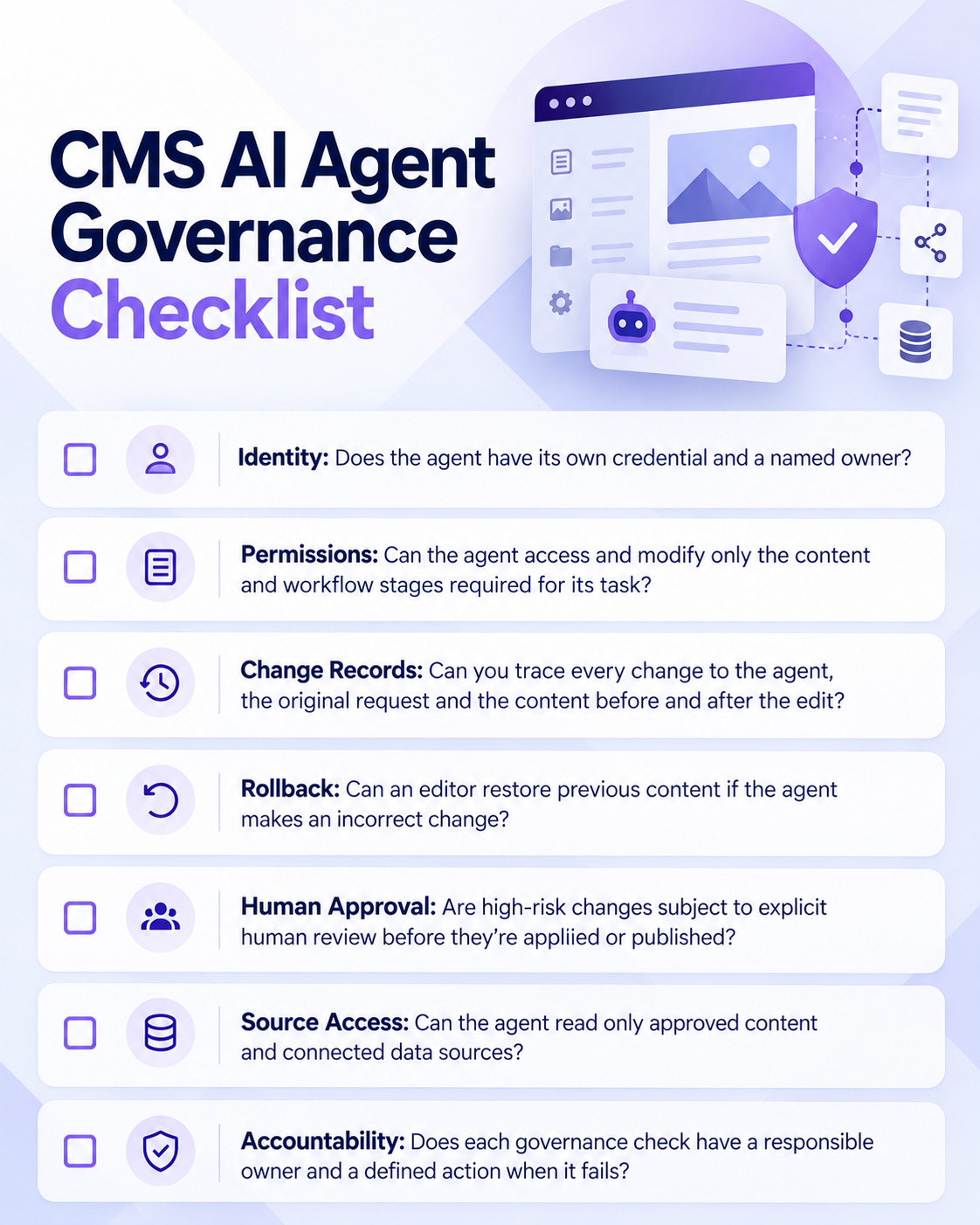
Image generated with ChatGPT
Review these controls before the agent’s first run and revisit them whenever its responsibilities, integrations or permissions change. If a check fails, address the gap before expanding what the agent can do.
Learn more about Progress Sitefinity CMS and its AI capabilities.
Request a Demo
Continue reading...
Your web team is ready to connect an AI agent to the content management system (CMS). The first test looks harmless. Let the agent update stale copy on a few pages, then see how much time the editors save.
The text the agent rewrites is easy to inspect. The account and permissions the agent uses carry the larger risk, and those never make it into the demo. If the agent uses a shared service account, broad publishing permissions and every source the CMS can reach, a small editing task arrives with much larger authority. Before the first run, the editor and platform owner need to agree on the guardrails the CMS will enforce.
Start with Who’s Responsible for What
Before connecting an AI agent to your CMS, establish who’s responsible for keeping it within the rules. The platform owner and editor look at the same agent from different sides. One controls what the agent can access and do. The other makes sure its content changes are appropriate.
The table below shows how those responsibilities are divided. Think of it as a quick reference for who’s accountable for what, not a substitute for checking that the controls actually work.
| Governance Area | Platform Owner’s Responsibility | Editor’s Responsibility |
|---|---|---|
| Identity | Assign a unique credential and a named owner to the agent | Confirm changes are attributed to the expected agent |
| Permissions | Restrict what content and workflow stages the agent can change | Verify that only the requested content changed |
| Change records | Maintain records of agent activity and content changes | Review before-and-after changes and confirm they match the request |
| Rollback | Provide a reliable way to restore previous content | Know how to reverse an incorrect change |
| Human approval | Configure workflows that prevent unauthorized approval or publishing | Review and approve changes that require human judgment |
| Source access | Limit the content and external sources the agent can read | Verify that content claims are supported by approved sources |
| Accountability | Define what happens when a technical control fails | Reject or escalate changes that fail editorial checks. |
Know What Kind of AI Agent You Are Connecting
An AI agent inside a CMS is software that analyzes content and takes a defined action. That action might be suggesting a revision, changing a field or moving an item into a workflow stage. Those are different levels of authority, even when the product page uses one friendly word for all three, and the permissions should reflect the difference.
Progress Sitefinity, a CMS with built-in AI agents, shows why the distinction matters. Its Brand Voice and Style Agent reviews content against rules your team configures. With an active AI subscription and version 15.4.8631 or later, the Brand Voice and Style Agent presents suggestions for an editor to apply or reject. A custom agent can use configured tools, but Sitefinity requires a person to approve content changes before they are applied. Know which kind of agent you are deploying before anyone assigns credentials. “It’s just an assistant” is not a permissions model.
Give the Agent Its Own Identity
An agent’s identity is the dedicated CMS user account it acts under. An Access Key authenticates API requests as that user. An OAuth 2.0 client can instead be authorized to access the CMS on the user’s behalf. A separate identity lets the CMS attribute each content change to the agent’s account and lets the platform owner revoke the agent’s access without disabling other users or connections.
One common setup uses a dedicated backend user with an Access Key or an OAuth 2.0 client authorized to access the CMS on that user’s behalf. Make a test change and confirm that the CMS’s change history attributes it to the dedicated user. If the change history names a shared user instead, the credential proved access but not attribution, and “the service account did it” is where accountability goes to retire. Give the credential an owner and renewal date, then grant the user only the permissions the agent needs.
Separate Editing from Publishing
Identity tells the CMS who is acting. Permissions decide what that identity can do. An agent asked to revise body copy doesn’t need permission to delete entries, change templates, unpublish live pages or approve its own work. That last one has a way of slipping through, and anything grading its own homework will give itself full marks every time.
CMS roles group permissions, while approval workflows decide who may move content toward publication. The platform’s approval workflow lets an administrator create one, two or three review levels and assign approvers to each level. A separate role can let the agent edit and submit content without allowing it to approve or publish.
Configure both sides of the permission boundary. The agent may edit approved fields and submit the item for review, but it may not approve, publish or delete content. An agent allowed to approve its own edit has bypassed the separation the workflow was supposed to provide, which leaves you with an expensively configured decoration.
Record Every Change and Keep a Rollback Path
Permissions limit what an agent can change. A change record captures what happened within those limits and gives the editor a rollback starting point when a revision is wrong. The Progress Sitefinity Audit Trail module must be installed and activated. The module is available for Sitefinity Enterprise Edition and records create, update and delete operations for supported content types.
For each content change, keep four pieces of information:
- The agent’s own identity
- The person responsible for the agent
- The request or event that started the run
- The content before and after the change
The before-and-after record matters because an event saying “page updated” can’t restore the previous text. That line is a rumor, not a record. Pair the change record with CMS version history or another tested rollback path, then make sure an editor can use that path without waiting for a developer responsible for the agent.
Decide Which Actions Need Human Review
A suggestion-only agent keeps an editor in control of every change. That is a strong guardrail when the editor can still evaluate each suggestion. The control weakens when suggestion volume turns review into repeated approval with no time to inspect the source, field changes or workflow state.
Set human-review rules by action rather than by whether the tool is called an assistant or an agent. Routine suggestions can stay in the normal editorial queue. Changes to legal copy, pricing, publishing state, templates or large groups of pages should stop for explicit approval. Track queue size and review time so the platform owner can see when the review step has become a click-through exercise. Thirty suggestions approved in four minutes isn’t review; it’s typing practice.
Limit What the Agent Can Read
An agent that only suggests changes still reads content and source material. Its CMS role should limit access to the sites, languages, content types and fields required for the task. If the agent can call external tools through the Model Context Protocol, treat each connected tool and data source as another permission boundary.
Keep restricted drafts, unreleased pricing and internal guidance outside the agent’s readable scope unless the task requires them. For permitted sources, define which source should support each kind of claim and which terminology rules apply. Then test the agent with content it should refuse to read, not only with the clean examples that make for a pleasant demo.
Give Every Check an Owner and a Stop Condition
A checklist nobody owns is a wish list. Each check from the table earlier needs a named owner on both sides, and each one needs a stop action for when it fails. Editors reject a change when fields outside the request changed, the item skipped a workflow stage or the source is unclear. Platform owners withhold or revoke the credential when identity, permissions, source access or change recording fails.
Start with the agents connected to your CMS today. For each one, record its identity, allowed actions, blocked actions, readable sources, change records and required human approvals. If any answer depends on a shared account or an unwritten team habit, the CMS still has a gap in its guardrails, and “someone would probably notice” has never qualified as a control.
Put Your CMS AI Agent Governance to the Test
Before connecting an AI agent to your CMS, make sure the right controls are in place. An agent should have a defined identity, limited permissions, approved sources, traceable changes and clear rules for human oversight.
Use this checklist to review your setup with your platform owner and editorial team:
Image generated with ChatGPT
Review these controls before the agent’s first run and revisit them whenever its responsibilities, integrations or permissions change. If a check fails, address the gap before expanding what the agent can do.
Learn more about Progress Sitefinity CMS and its AI capabilities.
Request a Demo
Continue reading...