
J
John Iwuozor
Guest
Watch for these eight signs that your script setup is no longer fitting the job. And what to do next.
Custom scripts can get you a long way. A Python routine here, a Bash cron job there and they can begin to support a growing share of your file transfer operations.
For a while, that works. But as more workflows get added, and new security and compliance requirements emerge, those scripts become harder to manage.
The problem is not necessarily that they are poorly written, or that scripts are the wrong tool. Most were built for a specific moment: a particular team, transfer volume or threat environment. The issue is that many organizations continue managing business-critical file transfer with custom scripts as infrastructure, as if these workflows are a small automation project.
But there comes a point when keeping them running demands too much manual work, specialist knowledge and workarounds. That is usually the clearest sign that the setup no longer fits the job.
Here are eight signs you have reached that point.
When one developer writes and maintains your file transfer scripts, most of the knowledge stays with them. They understand the naming conventions, retry logic and small fixes added after previous failures.
This creates a key-person dependency problem. If that developer moves to another team or leaves the company, someone else has to work backward through business-critical scripts that may be poorly documented and written in a style only the original developer fully understands.
Your scripts may record when a job starts, finishes or fails. But could you show an auditor which files moved, who initiated the transfer, where they went and what changed?
That is where script-based environments often fall short. Logging must be built and maintained deliberately, else records can quickly become incomplete or scattered across multiple scripts.
This matters when compliance teams need evidence. For example, PCI DSS requires organizations to record system activity, protect audit logs and review them regularly. HIPAA also requires covered organisations to record and examine activity involving electronic protected health information.
The consequences can extend beyond a failed audit. IBM found that the average data breach cost $4.44 million globally in 2025, while healthcare breaches averaged $7.42 million.

Source: IBM
Without a consistent audit trail, every compliance request could become a manual investigation across scripts, servers and incomplete logs.
Custom scripts do not automatically tell you when something goes wrong. Someone has to build the alerting, decide who receives it and make sure it still works as the environment changes.
Even then, the notification may go only to the developer who wrote the script rather than to the operations team responsible for the wider process.
That becomes a problem when the transfer fails. One missed transfer can delay processing, interrupt a customer delivery or trigger a support issue. In high-volume environments, the effects can spread quickly. Teams end up searching for missing data and tracing the problem back to a script that exited probably hours earlier.
ITIC’s 2024 Hourly Cost of Downtime Survey found that more than 90% of midsize and large enterprises faced downtime costs above $300,000 per hour, while 41% reported costs exceeding $1 million.
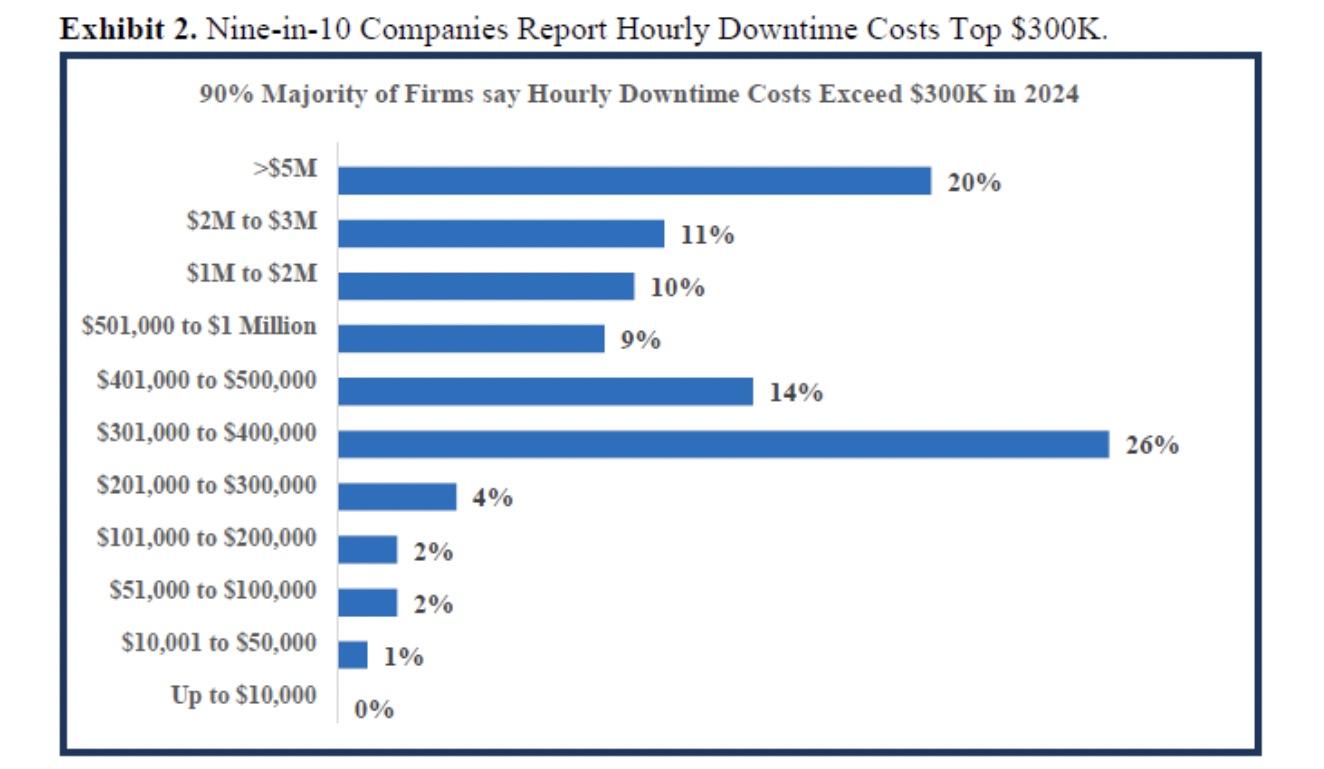
Source: ITIC
At that point, detecting a failed transfer after the disruption has already begun is no longer good enough.
Script sprawl rarely happens all at once. You start with one script for one workflow. Another transfer needs slightly different logic, so you write a second. Then a partner requires another protocol, and a third appears.
Before long, you have dozens of scripts owned by different people and touching different systems. Without clear ownership and centralised visibility over what scripts exist and what they touch, enforcing consistent security and compliance controls becomes almost impossible.
Because they were created independently, those scripts may use different authentication methods, logging formats and security controls. Applying one standard across the environment becomes difficult, and proving that consistency during an audit becomes harder still.
Adding a new partner should be a repeatable process. In a script-based environment, it often becomes a small development project. Someone has to understand the existing logic, adapt it to the partner’s protocol, file format, credentials and transfer schedule, then test everything without disrupting current workflows.
If only one or two people understand the scripts, the process also depends on their availability. A connection that should take days stretches into weeks, while every new partner adds another variation that has to be maintained.
When onboarding cannot happen without writing or modifying code, the scripts are no longer helping you move quickly. They have become the reason you cannot.
Custom scripts move files. They do not, unless explicitly built to do so, track what those files contain, who requested the transfer or whether the content meets data governance requirements.
That creates real risk when files are exchanged with customers, suppliers and other external partners. Verizon’s 2026 Data Breach Investigations Report found that 48% of breaches involved a third party, including software supply chains and hosting partners.
Without enough visibility, you cannot reliably enforce data classification rules, confirm that sensitive information was handled correctly or spot when a file has moved beyond its intended destination.
Custom scripts are sized for a specific workload at a specific point in time.
When transfer volume grows, scripts do not automatically scale. Instead, they slow down or fail in ways that are difficult to diagnose without deep knowledge of how they were written.
The lack of visibility makes this harder. Most scripts do not give you throughput metrics, latency trends or warnings that capacity is running low. Your team may not realize the environment is under strain until transfers start failing.
When a new vulnerability is disclosed in an underlying library, a protocol is deprecated or an encryption standard is updated, the script does not update itself. Someone has to identify the issue, find every affected script, update the code and test that the transfers still work.
That may be manageable with a handful of scripts. Across a larger estate, it becomes a recurring maintenance burden that is easily pushed behind more immediate operational work.
If several of these signs feel familiar, writing another script may only add to the problem. The larger issue is that your file transfer logic is spread across separate codebases, servers and individual owners.
Progress Automate MFT brings that work into one centrally managed platform. Teams can still use custom PowerShell when a workflow genuinely requires it, but routine transfers can be built and managed without creating another standalone script.
Its key capabilities include:
Together, these capabilities address many of the problems that appear when custom scripts become infrastructure.
They do not remove the need for every supporting control. But they give your team a clearer and more consistent way to build and monitor the workflows responsible for moving those files.
Progress Automate MFT offers a free 30-day trial. Request yours today!
Request Trial
Continue reading...
Custom scripts can get you a long way. A Python routine here, a Bash cron job there and they can begin to support a growing share of your file transfer operations.
For a while, that works. But as more workflows get added, and new security and compliance requirements emerge, those scripts become harder to manage.
The problem is not necessarily that they are poorly written, or that scripts are the wrong tool. Most were built for a specific moment: a particular team, transfer volume or threat environment. The issue is that many organizations continue managing business-critical file transfer with custom scripts as infrastructure, as if these workflows are a small automation project.
But there comes a point when keeping them running demands too much manual work, specialist knowledge and workarounds. That is usually the clearest sign that the setup no longer fits the job.
Here are eight signs you have reached that point.
1. A Single Person Owns the Transfer Logic
When one developer writes and maintains your file transfer scripts, most of the knowledge stays with them. They understand the naming conventions, retry logic and small fixes added after previous failures.
This creates a key-person dependency problem. If that developer moves to another team or leaves the company, someone else has to work backward through business-critical scripts that may be poorly documented and written in a style only the original developer fully understands.
2. You Cannot Produce a Transfer Audit Trail on Demand
Your scripts may record when a job starts, finishes or fails. But could you show an auditor which files moved, who initiated the transfer, where they went and what changed?
That is where script-based environments often fall short. Logging must be built and maintained deliberately, else records can quickly become incomplete or scattered across multiple scripts.
This matters when compliance teams need evidence. For example, PCI DSS requires organizations to record system activity, protect audit logs and review them regularly. HIPAA also requires covered organisations to record and examine activity involving electronic protected health information.
The consequences can extend beyond a failed audit. IBM found that the average data breach cost $4.44 million globally in 2025, while healthcare breaches averaged $7.42 million.
Source: IBM
Without a consistent audit trail, every compliance request could become a manual investigation across scripts, servers and incomplete logs.
3. Failed Transfers Require Manual Intervention to Detect
Custom scripts do not automatically tell you when something goes wrong. Someone has to build the alerting, decide who receives it and make sure it still works as the environment changes.
Even then, the notification may go only to the developer who wrote the script rather than to the operations team responsible for the wider process.
That becomes a problem when the transfer fails. One missed transfer can delay processing, interrupt a customer delivery or trigger a support issue. In high-volume environments, the effects can spread quickly. Teams end up searching for missing data and tracing the problem back to a script that exited probably hours earlier.
ITIC’s 2024 Hourly Cost of Downtime Survey found that more than 90% of midsize and large enterprises faced downtime costs above $300,000 per hour, while 41% reported costs exceeding $1 million.
Source: ITIC
At that point, detecting a failed transfer after the disruption has already begun is no longer good enough.
4. Your Script Count Has Become Unmanageable
Script sprawl rarely happens all at once. You start with one script for one workflow. Another transfer needs slightly different logic, so you write a second. Then a partner requires another protocol, and a third appears.
Before long, you have dozens of scripts owned by different people and touching different systems. Without clear ownership and centralised visibility over what scripts exist and what they touch, enforcing consistent security and compliance controls becomes almost impossible.
Because they were created independently, those scripts may use different authentication methods, logging formats and security controls. Applying one standard across the environment becomes difficult, and proving that consistency during an audit becomes harder still.
5. Onboarding New Partners Takes Weeks
Adding a new partner should be a repeatable process. In a script-based environment, it often becomes a small development project. Someone has to understand the existing logic, adapt it to the partner’s protocol, file format, credentials and transfer schedule, then test everything without disrupting current workflows.
If only one or two people understand the scripts, the process also depends on their availability. A connection that should take days stretches into weeks, while every new partner adds another variation that has to be maintained.
When onboarding cannot happen without writing or modifying code, the scripts are no longer helping you move quickly. They have become the reason you cannot.
6. You Have No Visibility Into What Is Being Transferred
Custom scripts move files. They do not, unless explicitly built to do so, track what those files contain, who requested the transfer or whether the content meets data governance requirements.
That creates real risk when files are exchanged with customers, suppliers and other external partners. Verizon’s 2026 Data Breach Investigations Report found that 48% of breaches involved a third party, including software supply chains and hosting partners.
Without enough visibility, you cannot reliably enforce data classification rules, confirm that sensitive information was handled correctly or spot when a file has moved beyond its intended destination.
7. Scaling Transfer Volume Degrades Performance or Breaks Things
Custom scripts are sized for a specific workload at a specific point in time.
When transfer volume grows, scripts do not automatically scale. Instead, they slow down or fail in ways that are difficult to diagnose without deep knowledge of how they were written.
The lack of visibility makes this harder. Most scripts do not give you throughput metrics, latency trends or warnings that capacity is running low. Your team may not realize the environment is under strain until transfers start failing.
8. Security Updates Require Developer Intervention
When a new vulnerability is disclosed in an underlying library, a protocol is deprecated or an encryption standard is updated, the script does not update itself. Someone has to identify the issue, find every affected script, update the code and test that the transfers still work.
That may be manageable with a handful of scripts. Across a larger estate, it becomes a recurring maintenance burden that is easily pushed behind more immediate operational work.
How Progress Automate MFT Addresses These Gaps
If several of these signs feel familiar, writing another script may only add to the problem. The larger issue is that your file transfer logic is spread across separate codebases, servers and individual owners.
Progress Automate MFT brings that work into one centrally managed platform. Teams can still use custom PowerShell when a workflow genuinely requires it, but routine transfers can be built and managed without creating another standalone script.
Its key capabilities include:
Visible, reusable workflows: Transfers are configured through a browser-based, point-and-click interface using reusable tasks, endpoints and authentication methods. This makes the logic easier for other team members to review and update without relying entirely on the person who originally built it.
Central monitoring and audit records: Teams can see current and historical task runs, file activity, transfer status and errors from one place. Audit reports also record system activity, task execution and user actions, making it easier to produce evidence without searching through logs from multiple scripts and servers.
Built-in failure handling: Retries, delays and operational notifications can be configured as part of the workflow rather than rebuilt separately for every script. This gives operations teams a better chance of identifying and resolving failed transfers before another process is disrupted.
Reusable partner and system connections: SFTP, FTPS, HTTPS, SMTP and network file shares can be managed alongside cloud and SaaS endpoints. Connection and authentication details can be configured once and reused across workflows, reducing the amount of new code required whenever another partner or system is added.
Consistent access controls: Automate MFT supports role-based access control, single sign-on and configurable permissions. Instead of every script handling credentials and access differently, teams can manage who is allowed to view, create and change workflows more consistently.
More room to scale: File transfers can be executed by agents placed close to the data while workflows are managed centrally. Self-hosted agent pools can distribute tasks across available agents and keep workflows running through another agent when one loses connectivity.
Together, these capabilities address many of the problems that appear when custom scripts become infrastructure.
They do not remove the need for every supporting control. But they give your team a clearer and more consistent way to build and monitor the workflows responsible for moving those files.
Progress Automate MFT offers a free 30-day trial. Request yours today!
Request Trial
Continue reading...