Powerful UI Design for the Maintenance of Parent/Child Dataset

Bruce Noble

New Member
Not looking for code here. Just intelligent design, maybe some screenshots.
We have all maintained related parent/child tables, generally with a single commit. I have an unusual situation where I not only need to add/change/delete on both the parent and child levels, but I also need to be able to copy entire sets at the parent level, individual children within a parent/child set, and perform other "mass update" functions on the data. So far, an intuitive design that avoids a lot of buttons and on-screen noise that confuses the user upon screen realization has eluded me. Anyone with ideas?
 
No, but I think this thread belongs in the Development forum, rather than General Announcements | Chit Chat. You may get more engagement there.
 
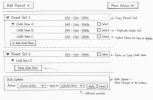
You could combine functions in one button with an arrow on the right side of the button, giving the user a choice in copying just the top record or the whole collection, something along this lines:
1775636703747.png

A second option would be to pop up a context menu with the separate options.
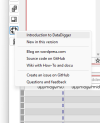
I do this in DataDigger when you press the 'Help' button:

1775636513302.png

Code:
  DEFINE VARIABLE iReturn AS INTEGER NO-UNDO.

  /* Force right mouse click on help button */
  &GLOBAL-DEFINE WM_RBUTTONDOWN 516
  &GLOBAL-DEFINE MK_RBUTTON 2
  &GLOBAL-DEFINE WM_RBUTTONUP 517
 
  RUN SendMessageA (INPUT SELF:HWND, INPUT {&WM_RBUTTONDOWN}, INPUT {&MK_RBUTTON}, INPUT 0, OUTPUT iReturn).
  RUN SendMessageA (INPUT SELF:HWND, INPUT {&WM_RBUTTONUP}  , INPUT 0            , INPUT 0, OUTPUT iReturn).
 
Thanks, Patrick. I thought about the pop-up menu, but it wasn't as elegant a solution as I would want. The goal is to accomplish the ability to do all of these functions while not A) cluttering the screen and making it hard to know what to focus on, and B) not making any of the functions "hidden" as they somewhat appear to be by your only finding what you want through a combination of drop-downs, or a big run-on drop-down. That makes the solution too oblique. I'm thinking something more graphical. Playing with designs based on a Venn diagram theme. Where the overlapping areas (not necessarily circular) identify "level" (parent/child) without a lot of words, but all of the embedded functions within that area or color would obviously be associated with that level. So, you don't have to have a "Copy Parent" and "Copy Child" selections, simply "Copy" will do from context. I realize that's still two objects, but you get where my head is going. I'm trying to make spatial relationships, color, and/or graphical objects convey a lot of the context without a lot of words.
 
A challenge with something visual - I love the idea, must say - is that of screen real estate. Maybe it could be on its own dialog that pops up when you select a Copy menu item or button.

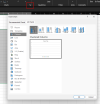
Something like the dialog that pops up when you click on the "all charts" button in Excel.

1775654830082.png
 
Conveying signals via colour alone is a potential pitfall if you need to worry about accessibility, i.e. you need to provide colour-blindness support.
 
Back
Top