Files in DLCWRK folder aren't getting deleted, causing disk space utilization to spike

progress_rob

New Member
Details: We have a Windows Server 2019 running in an EC2 instance. And within that we have a Progress OpenEdge 11.7.17 server. An issue that first cropped up about a month ago, and has happened about 4 times in total so far, is that the space utilization on our E: drive (which contains the Progress working folder DLCWRK) begins steadily creeping up for no apparent reason, and then continues that way until it reaches 98, 99 percent. At which point we have no choice but to reboot the entire server. After the reboot, it immediately drops down to normal levels (~30%). The E: drive should have enough space, about 200 GB, but when the issue begins it takes less than 24 hours for all that space to get eaten up.

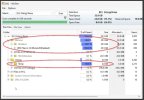
Using WizTree, we were able to find that the disk space usage is in a folder called E:\$Extend\$Deleted. Which, after some Googling, I found out is a hidden directory used by the NTFS system for files that are slated for deletion but are still locked by some process. We are unable to figure out a way to clear this $Deleted folder, or even figure out what process is preventing the files from being deleted.

Since the E: drive contains basically only the DLCWRK folder, we are wondering if there might be some process that is keeping a handle on those files open and preventing them from being deleted correctly. This leads to the files remaining on disk, and this causes the available free space on disk to reduce over time.

Has anyone encountered this issue before and has an idea of how to resolve it? Or, even any suggestions as to what steps to take to investigate this behaviour further would be appreciated. TIA!
 
Hi @Rob Fitzpatrick, thanks for your reply. Yeah we have not specified the -T parameter separately, so the temporary files are also being written to the same folder, E:\DLCWRK. Do you believe these files might be related to the issue at hand?
 
They could be. The DBI files (temp-table database) in particular can grow quite large when there is extensive use of temp-tables. I have seen them grow to hundreds of megabytes per session. Of course this is completely dependent on application code, data, and user behaviour, so I can't provide insight into what your file sizes should be.

By default, temporary files have the hidden attribute in the file system. You can change that by adding the -t client startup parameter to make the files visible while they are being used.

Some additional notes on -t:
  • Ordinarily, when a session terminates gracefully it cleans up its temporary files. And if the session crashes, you don't need to clean them up because the files are unlinked. This latter point changes with -t; you will need to manually clean up these files if the session crashes.
  • The -t parameter is not permitted when the database is enabled for encryption via OpenEdge TDE.
 
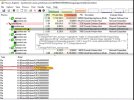
We are using PASOE 12.2.16 and found that the mproapsv.exe was holding over 6.5 GB in one of the files in that folder H:\$Extend\$Deleted on our "Temp" folder drive. Using Process Explorer from Sysinternals we could connect the file unique identifier to the file in WizTree looking at the file handles pane in Process explorer. The only issue we have now is that we cannot just stop the Progress Multithreaded agent without disconnecting all the other users connected to that agent. Our agents are using the Bound (session-managed) Session model which is similar to the State-reset model in classic. How can we tell why the agent is holding to these large Files?
 
@Dan4gl Your inquiry is unrelated to the original post. In future, please start a new thread for a new issue.

It seems that at some point Progress changed the way they handle session temporary files on Windows, in particular the DBI file. I don't know which version marked the change. It used to be that the DBI file (the temp-table database) had a file name like DBIa<TID><PID> in the session temporary directory (-T); that may not be precisely correct, my memory is foggy. The file had the hidden attribute set, like the other session temporary files (srt*, lbi*, rcd*), but otherwise was a normal file.

Now the DBI file in particular is written to <drive>:\$Extend\$Deleted. $Extend is an NTFS metadata directory. $Deleted is a relatively new addition to $Extend; Win 10/Server 2016, or thereabouts. It holds NTFS metadata entries for files that are deleted but still have open file handles. The entries are cleaned up when the handles are closed or the server reboots. Other applications might write data there too, e.g. security/AV filter drivers.

In PASOE, _mproapsv.exe is the Multi-Session App Server (MSAS) process. It is multi-threaded, and each ABL session thread is a separate AVM with its own set of temporary files. And there may be multiple MSAS processes per application. The maximum number of sessions per agent is given by the maxABLSessionsPerAgent property in the application stanza in $CATALINA_BASE/conf/openedge.properties.

If you have used the handle view in Process Explorer to determine that the entries in $Extend\$Deleted belong to _mproapsv.exe, you need to look at your application's use of temp-tables to see why they are growing so large (caching large tables?), and perhaps whether you have memory leaks. Some options: the DynObjects.DB and Temp-Tables log entry types, the temp-table virtual system tables, and (12.8+) the OpenEdge memory profiler.
 
@Dan4gl Your inquiry is unrelated to the original post. In future, please start a new thread for a new issue.

It seems that at some point Progress changed the way they handle session temporary files on Windows, in particular the DBI file. I don't know which version marked the change. It used to be that the DBI file (the temp-table database) had a file name like DBIa<TID><PID> in the session temporary directory (-T); that may not be precisely correct, my memory is foggy. The file had the hidden attribute set, like the other session temporary files (srt*, lbi*, rcd*), but otherwise was a normal file.

Now the DBI file in particular is written to <drive>:\$Extend\$Deleted. $Extend is an NTFS metadata directory. $Deleted is a relatively new addition to $Extend; Win 10/Server 2016, or thereabouts. It holds NTFS metadata entries for files that are deleted but still have open file handles. The entries are cleaned up when the handles are closed or the server reboots. Other applications might write data there too, e.g. security/AV filter drivers.

In PASOE, _mproapsv.exe is the Multi-Session App Server (MSAS) process. It is multi-threaded, and each ABL session thread is a separate AVM with its own set of temporary files. And there may be multiple MSAS processes per application. The maximum number of sessions per agent is given by the maxABLSessionsPerAgent property in the application stanza in $CATALINA_BASE/conf/openedge.properties.

If you have used the handle view in Process Explorer to determine that the entries in $Extend\$Deleted belong to _mproapsv.exe, you need to look at your application's use of temp-tables to see why they are growing so large (caching large tables?), and perhaps whether you have memory leaks. Some options: the DynObjects.DB and Temp-Tables log entry types, the temp-table virtual system tables, and (12.8+) the OpenEdge memory profiler.
Thank you as this is very helpful.. problem is we cant enable logging on a large user system due to performance issue but would have to do so in our QA environment. Sorry for posting on an old post, but the extend/deleted folder was similar to what we were seeing. We are also seeing the disk space getting used up .
 
How can we tell why the agent is holding to these large Files?

If you have installed the oemanager webapp you can see - through OE Explorer / Management or the REST API , maybe via the Swagger interface - which programs are currently memory-resident ("session stacks"), and potentially which objects (eg handles, memptrs, class-based objects) are memory resident . You can also get the current memory consumption for each ABL session ("ABL Objects tracking"). The page at Progress Documentation is a good starting point for seeing what's available.

You can figure out which DBI file is in use by a session (using temp-table VSTs) but you would need to write and deploy some code to do that.

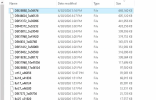
To see all the files in -T, use the -t (lowercase t) startup parameter. This would require a change to openedge.properties or to a .PF used from there . Unless you are using TDE, that will cause the files to be visible (not hidden).
 
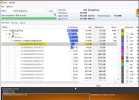
I have attached a screen shot of what we see when using Wiztree , so not an issue of unhiding files. We know that the files are hidden by default, but this seems to be some OS (windows) item. This is very similar to the original post. Using Process Explorer we can trace the files to an Agent based on file handle but not filename as that is not in the windows temp folder.
 

Attachments

  • extenddeletedfiles.jpg
    extenddeletedfiles.jpg
    99.6 KB · Views: 7
i do think that the disk usage is related to one of the following : lbi... rcda.. , DBI, or SRT files ,but since the file is marked for deletion and is in this odd state, we cannot tell what file type is consuming the disk space. Look at the screen shots attached and you will see why we cannot tell what the file is. We know that its one of the Progress temp files as when we are able to trim off the agents the space is reclaimed and the mystery files disappear.
 

Attachments

  • processexplorer.jpg
    processexplorer.jpg
    129 KB · Views: 10
  • Wiztree_temp drive.jpg
    Wiztree_temp drive.jpg
    75.2 KB · Views: 10
Last edited:
Back
Top