
I hate to ask an unsmart question but...
Windows
I did a dump of data and sequences of a v9.1 workgroup database with Level I storage and a load into a v12.8 workgroup database with Level II storage.
I noticed that it appears that all of the data went into my schema area.
I may not know how to read it properly but from a file size standpoint it seems to be that.
The dump was straight forward and so was the load.
To be clear, I had previously created the v12.8 database and was running it in "test environment". I am refreshing the data with backed up data from v9. This is a go live simulation.
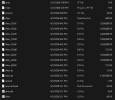
Before doing this I did not note the size of schema extent but it is now the size of my whole database which is odd and indicates that I may have missed a step.
I will share my set file and the screenshot of the data folder.
my set file:
____________________________________
#
b E:\AriesBI\Aries.b1 f 819200
b E:\AriesBI\Aries.b2
#
d "Schema Area":6,64;1 D:\AriesDB\Aries.d1
#
a F:\AriesAI\Aries.a1
#
a F:\AriesAI\Aries.a2
#
a F:\AriesAI\Aries.a3
#
d "DataArea":10,128;64 D:\AriesDB\Aries_10.d1 f 1024000
d "DataArea":10,128;64 D:\AriesDB\Aries_10.d2 f 1024000
d "DataArea":10,128;64 D:\AriesDB\Aries_10.d3 f 1024000
d "DataArea":10,128;64 D:\AriesDB\Aries_10.d4 f 1024000
d "DataArea":10,128;64 D:\AriesDB\Aries_10.d5 f 1024000
d "DataArea":10,128;64 D:\AriesDB\Aries_10.d6
#
a F:\AriesAI\Aries.a4
#
a F:\AriesAI\Aries.a5
#
a F:\AriesAI\Aries.a6
#
a F:\AriesAI\Aries.a7
#
a F:\AriesAI\Aries.a8
#
a F:\AriesAI\Aries.a9
#
a F:\AriesAI\Aries.a10
#
d "IndexArea":20,128;64 D:\AriesDB\Aries_20.d1 f 1024000
d "IndexArea":20,128;64 D:\AriesDB\Aries_20.d2 f 1024000
d "IndexArea":20,128;64 D:\AriesDB\Aries_20.d3
______________________________________________________
Windows
I did a dump of data and sequences of a v9.1 workgroup database with Level I storage and a load into a v12.8 workgroup database with Level II storage.
I noticed that it appears that all of the data went into my schema area.
I may not know how to read it properly but from a file size standpoint it seems to be that.
The dump was straight forward and so was the load.
To be clear, I had previously created the v12.8 database and was running it in "test environment". I am refreshing the data with backed up data from v9. This is a go live simulation.
Before doing this I did not note the size of schema extent but it is now the size of my whole database which is odd and indicates that I may have missed a step.
I will share my set file and the screenshot of the data folder.
my set file:
____________________________________
#
b E:\AriesBI\Aries.b1 f 819200
b E:\AriesBI\Aries.b2
#
d "Schema Area":6,64;1 D:\AriesDB\Aries.d1
#
a F:\AriesAI\Aries.a1
#
a F:\AriesAI\Aries.a2
#
a F:\AriesAI\Aries.a3
#
d "DataArea":10,128;64 D:\AriesDB\Aries_10.d1 f 1024000
d "DataArea":10,128;64 D:\AriesDB\Aries_10.d2 f 1024000
d "DataArea":10,128;64 D:\AriesDB\Aries_10.d3 f 1024000
d "DataArea":10,128;64 D:\AriesDB\Aries_10.d4 f 1024000
d "DataArea":10,128;64 D:\AriesDB\Aries_10.d5 f 1024000
d "DataArea":10,128;64 D:\AriesDB\Aries_10.d6
#
a F:\AriesAI\Aries.a4
#
a F:\AriesAI\Aries.a5
#
a F:\AriesAI\Aries.a6
#
a F:\AriesAI\Aries.a7
#
a F:\AriesAI\Aries.a8
#
a F:\AriesAI\Aries.a9
#
a F:\AriesAI\Aries.a10
#
d "IndexArea":20,128;64 D:\AriesDB\Aries_20.d1 f 1024000
d "IndexArea":20,128;64 D:\AriesDB\Aries_20.d2 f 1024000
d "IndexArea":20,128;64 D:\AriesDB\Aries_20.d3
______________________________________________________

