
Debugger conditional breakpoints

jmac13

Member
Hi I'm using open edge 10.2B I'm trying to use the debugger conditional breakpoints in the pdf about the debugger it says it can use comparison operators (=,<>,EQ,NE etc) but I cant seem to get it to work. It only every does a break if the variable changes when i want it to break when the variable changes to a certain value e.g. 10, which I cant work out how to do.
(see picture for example)
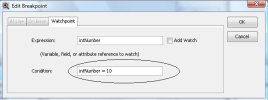
edit Breakpoint.jpg


so is it possible and if so what am I doing wrong

Cheers
 
Don't know too much about the debugger itself, but you can invoke the debugger from within the 4GL with the DEBUGGER handle:
DEBUGGER:INITIATE ( ).
DEBUGGER:SET-BREAK ( ).

For one it gives you the possibility to conditionally debug depending on some logic in your application. But it's not a very elegant solution as you need to change the code for that.

Heavy Regards, RealHeavyDude.
 
Yeah cheers RHD

I had seen that in the the pdf but like you say need to make changes to the code. But its a good option if i cant use whats there. Just a bit annoying as the way I read it in the docs is that you could do in the debugger but I havent work out how or if is possible.

Thanks for the post back hopeful someone else will put me out my Misery :P
 
It actually does work.

Code:
DEF VAR ii AS INT.

ii = 0. /* added to ensure INITIAL break point is not on loop */

DO ii = 1 TO 10:

END.

Now start the debugger and set watchpoint to expression ii and condition ii = 5.
Now continue (F5), the debugger will stop when ii has value 5.

The slightly confusing part, is that when you run the code directly from the client as 'debug', an initial debugger break point is put on the first executable line, which in my case was the loop causing the debugger to stop at each iteration.
 
I tried doing that but doesn’t seem to work. I added the watch then I do a continue and the program just goes on as normal I tried the following:


Code:
    [/FONT]
[FONT=Tahoma][/FONT] 
[FONT=Tahoma] session:debug-alert = true.
      message "DEBUG"
                view-as alert-box information
                buttons ok.[/FONT]
[FONT=Tahoma]
    DEF VAR ii AS INT.
    ii = 0. /* added to ensure INITIAL break point is not on loop */
    
    DO ii = 1 TO 10:
        if ii = 5 then
            chrtest = "TEST".
    END.

I get a message to come up so i can start the debugger in the right place I then set the watch on ii condtion ii=5 then press continune and just runs the program doesnt stop to allow me to see the change to chrtest
 
Interesting, you need to strip all spaces from the condition. I added ii = 5, it didn't work. I looked back at the watchpoint and noticed that it had ii as condition.

So add ii=5 as condition... lovely.
 
Back
Top