Question OS-COMMAND and the quotes.

I need to start a Progress session using a OS-COMMAND.
There is a space in DLC path , so I need to put the path to the executable file in quotation marks.
Also I need to use the quotes for the parameters passed to a Progress executable (e.g. for –pf).
But if the command uses more than one pair of quotes, I get an error as if they were not used at all:
Code:
DEFINE VARIABLE vCommand AS CHARACTER NO-UNDO.
ASSIGN vCommand = SEARCH("_progres.exe").
OS-COMMAND VALUE(QUOTER(vCommand) + ' -param ""').
'C:\Progress\OpenEdge' is not recognized as an internal or external command, operable program or batch file.

Test without Progress:
Code:
DEFINE VARIABLE vCommand AS CHARACTER NO-UNDO.
ASSIGN vCommand = '"cmd" /c echo param "abc"x'.
OS-COMMAND VALUE(vCommand).

Instead of
param "abc"x
I’m getting:
param "abcx

One quote is always lost - no matter how many quotes I would add.

Code:
DEFINE VARIABLE vCommand   AS CHARACTER NO-UNDO.
ASSIGN vCommand = 'cmd /c echo param "abc"x'.
OS-COMMAND VALUE(vCommand).

It returns the expected result:
param "abc"x

Note: there are no quotation marks around cmd - it's the only difference.

Is this a known issue? Is there a solution?
 
Last edited:
Starting something via OS-COMMAND is a real pain. I used to generate a batch file and then start that, but now I use this:
Code:
/*-----------------------------------------------------------------------
  File : startSession.p
  Desc : Start a new session

  PARAMETERS:
  - pcProgram   : The startup procedure. Cannot have parameters itself
  - pcParameter : Value that will be added via -param
                                     
  ------------------------------------------------------------------------*/

&IF "{&FILE-NAME}" MATCHES "*.cmp" &THEN /* from editor */
  DEFINE VARIABLE pcProgram   AS CHARACTER NO-UNDO INITIAL 'c:\temp\helloWorld.p'.
  DEFINE VARIABLE pcParameter AS CHARACTER NO-UNDO INITIAL 'testing-1-2-3'.
&ELSE
  DEFINE INPUT PARAMETER pcProgram AS CHARACTER NO-UNDO.
  DEFINE INPUT PARAMETER pcParameter AS CHARACTER NO-UNDO.
&ENDIF

PROCEDURE ProExec EXTERNAL "PROEXEC.DLL" CDECL:
  DEFINE INPUT PARAMETER prog_name     AS CHARACTER.
  DEFINE INPUT PARAMETER prog_style    AS LONG. /* 1=normal 2=minimized */
  DEFINE INPUT PARAMETER wait_for_me   AS LONG.
  DEFINE INPUT PARAMETER num_seconds   AS SHORT.
  DEFINE RETURN PARAMETER return_value AS LONG.
END.

DEFINE VARIABLE cProwin  AS CHARACTER NO-UNDO.
DEFINE VARIABLE cParams  AS CHARACTER NO-UNDO.
DEFINE VARIABLE i        AS INTEGER   NO-UNDO.
DEFINE VARIABLE lSkip    AS LOGICAL   NO-UNDO.
DEFINE VARIABLE cCommand AS CHARACTER NO-UNDO.
DEFINE VARIABLE iStat    AS INTEGER   NO-UNDO.

// Determine progress executable (32 or 64 bit)
FILE-INFO:FILE-NAME = "prowin.exe".
IF FILE-INFO:FULL-PATHNAME = ? THEN FILE-INFO:FILE-NAME = "prowin32.exe".
cProwin = FILE-INFO:FULL-PATHNAME.
IF cProwin = ? THEN
DO:
  MESSAGE 'Progress executable not found' VIEW-AS ALERT-BOX INFORMATION BUTTONS OK.
  RETURN.
END.

// Find startup procedure
IF SEARCH(pcProgram) = ? THEN
DO:
  MESSAGE 'Program "' + pcProgram + '" not found' VIEW-AS ALERT-BOX INFORMATION BUTTONS OK.
  RETURN.
END.

// Build parameter list
DO i = 1 TO NUM-ENTRIES(SESSION:STARTUP-PARAMETERS):
 
  IF ENTRY(i, SESSION:STARTUP-PARAMETERS) = '(end .pf)' THEN
  DO:
    lSkip = FALSE.
    NEXT.
  END.

  IF NOT lSkip THEN
    cParams = cParams + ' ' + ENTRY(i, SESSION:STARTUP-PARAMETERS).

  IF ENTRY(i, SESSION:STARTUP-PARAMETERS) BEGINS '-pf' THEN
    lSkip = TRUE.
END.

cCommand = SUBSTITUTE('&1 &2 -p &3', cProwin, cParams, pcProgram).
IF pcParameter <> "" THEN cCommand = SUBSTITUTE('&1 -param "&2"', cCommand, pcParameter).

&IF "{&FILE-NAME}" MATCHES "*.cmp" &THEN /* from editor */
  MESSAGE cCommand VIEW-AS ALERT-BOX INFORMATION BUTTONS OK.
&ENDIF

RUN ProExec(cCommand, 1, 0, 5, OUTPUT iStat).
 

Attachments

Thank you, Patrick!
I agree - OS-COMMAND seems to be a dead end.
The bug is very tricky. I can't understand its logic. It's the only reason why I'm still trying to find out a solution.
 
FILE-INFO:FILE-NAME = "prowin.exe". IF FILE-INFO:FULL-PATHNAME = ? THEN FILE-INFO:FILE-NAME = "prowin32.exe". cProwin = FILE-INFO:FULL-PATHNAME.

4 days ago Tom Bascom wrote:
"I wouldn't be using PROWIN.EXE for a background service. That is the job of _PROGRES.EXE"

Progress community appears to be divided into parties - the supporters of prowin and the ones who prefer _progres. :)
 
Workaround for OS-COMMAND is found: the extra quotation marks around the whole command:
Code:
DEFINE VARIABLE vCommand   AS CHARACTER NO-UNDO.
ASSIGN vCommand = SEARCH("_progres.exe").
OS-COMMAND VALUE('"' + QUOTER(vCommand) + ' -param "a b""').

It's still a mystery.
 
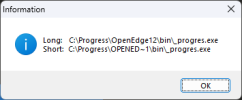
Alternative is to convert the long file name (with spaces) to the short PathNames:
Code:
PROCEDURE GetShortPathNameA EXTERNAL "kernel32.dll" :
    DEFINE INPUT  PARAMETER lpszLongPath  AS CHARACTER.
    DEFINE INPUT  PARAMETER lpszShortPath AS MEMPTR.
    DEFINE INPUT  PARAMETER cchBuffer     AS LONG.
    DEFINE RETURN PARAMETER nResult       AS LONG.
END PROCEDURE.

FUNCTION GetShortPath RETURNS CHARACTER (INPUT pcLongPath AS CHARACTER):
    DEFINE VARIABLE mBuffer    AS MEMPTR    NO-UNDO.
    DEFINE VARIABLE iSize      AS INTEGER   NO-UNDO.
    DEFINE VARIABLE iResult    AS INTEGER   NO-UNDO.
    DEFINE VARIABLE cShortPath AS CHARACTER NO-UNDO.

    /* First call: pass 1-size buffer to get required buffer size */
    SET-SIZE(mBuffer) = 1.
   // SET-SIZE(mBuffer) = LENGTH(pcLongPath, "raw").   
    
    RUN GetShortPathNameA(
        INPUT  pcLongPath,
        INPUT  mBuffer,
        INPUT  0,
        OUTPUT iSize).

    IF iSize = 0 THEN
        RETURN ERROR "GetShortPathName failed on size query for: " + pcLongPath.

    /* Second call: allocate buffer and retrieve short path */
    SET-SIZE(mBuffer) = 0.
    SET-SIZE(mBuffer) = iSize.
    SET-BYTE-ORDER(mBuffer) = BIG-ENDIAN.

    RUN GetShortPathNameA(
        INPUT  pcLongPath,
        INPUT  mBuffer,
        INPUT  iSize,
        OUTPUT iResult).

    IF iResult = 0 THEN DO:
        SET-SIZE(mBuffer) = 0.
        RETURN ERROR "GetShortPathName failed for: " + pcLongPath.
    END.

    cShortPath = GET-STRING(mBuffer, 1).

    /* Always free MEMPTR memory */
    SET-SIZE(mBuffer) = 0.

    RETURN cShortPath.
END FUNCTION.


/* -- Main block -- */
DEFINE VARIABLE cLong  AS CHARACTER NO-UNDO.
DEFINE VARIABLE cShort AS CHARACTER NO-UNDO.

cLong = SEARCH("_progres.exe").

cShort = GetShortPath(INPUT cLong).

MESSAGE "Long:  " cLong  SKIP
        "Short: " cShort
    VIEW-AS ALERT-BOX INFORMATION.

Thus eliminating the spaces in folder names and reverting to the good old days of 8.3 DOS
1773651449182.png
 
Alternative is to convert the long file name (with spaces) to the short PathNames:
My goal is to copy all parameters of the current session (connected databases, session's parameters) and to launch new sessions with the same parameters. Almost as Patcick does in his example above. The parameter values may also contain the spaces. So it's better to quote them also.

The extra quotation marks around the whole command does work with OS-COMMAND and INPUT THROUGH. It looks like an undocumented feature.
 
I used to generate a batch file and then start that, but now I use this

Patrick,
Why did you choose to use ProExec?
It's a Progress .dll written to support Report Engine. It uses WinExec and WaitForSingleObject from kernel32.dll - the ancient (10/03/97) kbase article # 16735 was titled "Report Engine - WinExec errors in ProExec.dll".

If you need to create the processes only with wait_for_me = 0 then WinExec can totally replace ProExec.

I compared the different methods to create the processes on Windows:
Code:
OS-COMMAND      Async, Normal (NO-WAIT) or Synch, Minimized (SILENT)
INPUT THROUGH   Async, Minimized
ProExec         Sync/Async, Normal/Minimized
WinExec         Async, Normal/Minimized
CreateProcessA  Sync/Async, Normal/Minimized

VisualStyle: Normal/Minimized. "Normal" means that a process will create a console windows. "Minimized" means dCreationFlags = CREATE_NO_WINDOW.

Synchronous mode really means to create a process and to wait for it using WaitForSingleObject call.
Asynchronous mode means to create a request to create new process. It's an instant operation - a millisecond or faster. A process needs much more time to start - the /hundreds/ milliseconds, sometimes a few seconds. About the same time is required to wait for process termination.

BTW, an unexpected effect of launching processes in the asynchronous mode is the lost logout messages:
Code:
[2026/03/15@12:59:55.607+0300] P-43080      T-6636  I ABL     1: (452)   Login by george on CON:.
[2026/03/15@12:59:55.614+0300] P-43080      T-6636  I ABL     1: (7129)  Usr 1 set name to george.
[2026/03/15@12:59:55.624+0300] P-27212      T-3828  I ABL     3: (452)   Login by george on CON:.
[2026/03/15@12:59:55.630+0300] P-27212      T-3828  I ABL     3: (7129)  Usr 3 set name to george.
[2026/03/15@12:59:55.643+0300] P-3700       T-37440 I ABL     4: (452)   Login by george on CON:.
[2026/03/15@12:59:55.649+0300] P-3700       T-37440 I ABL     4: (7129)  Usr 4 set name to george.
[2026/03/15@12:59:56.715+0300] P-43080      T-6636  I ABL     1: (453)   Logout by george on CON:.
[2026/03/15@12:59:56.730+0300] P-3700       T-37440 I ABL     4: (453)   Logout by george on CON:.
Three processes logged in but we see only two logout messages. Of course, all processes leaved a database. Two of them did this at the same time. One logout message has overwritten another one. We can see the partial overlaps of the messages in the logs of production databases but it's impossible to verify if there were the completely overwritten messages. We can prove this only in test environment.

I put all methods in one test program - CreateProcessTest.p.
To run the test we need any database (vDbPath variable) started in multi-user mode (for example, the empty database). The messages in database log will give the time when a process is really started. CreateProcessTest.p also write the messages when it creates the processes. We can test _progres.exe, prowin.exe or prowin32.exe. Progress sessions are started with the -p quit.p which is just a QUIT statement. The -p parameter can be replaced by the -rr but only for _progres.exe.

I have a few questions about the CreateProcessA procedure but I will create a new thread to as them.
 

Attachments

Progress community appears to be divided into parties - the supporters of prowin and the ones who prefer _progres. :)

I know that in the past there have been comments from Progress devs on the internal differences between _progres.exe and prowin.exe/prowin32.exe. The gist was that for batch mode, a character client is more efficient as it doesn't deal with window messages in its event loop.

I am having trouble finding one of those conversations, although this KB alludes to it:
https://community.progress.com/s/article/Running-a-prowin32-exe-as-a-background-process-causes-extremely-slow-login-times-in-Windows
 
Back
Top