purge and resize db

I would prefer to
  • D&L, rebuild, do whatever" on a recent copy of the db on server B (no downtime concern), while doing uninterrupted business with original db on server A.
  • Then "synchronize" the newly refurbed instance on B "somehow" with all data that has been accumulated in the meantime on A
  • Stop both, copy B to A, restart
My plans regarding step 2 with progress means have been dismissed, so i guess i have to talk to my manufacturer to have him create some application-based synchronization workflow for maintenance scenarios like these. Think of denormalized ex/import or similar. They have hundreds of sites all in the same field of business (24/7) so this would be of universal use.
The PUG method looks pretty cool, but is not nowhere near my skills.
 
no,
no ABL compiler,
That's too bad. Is the vendor at least still providing support and bug fixes and willing to move you to a modern OE release?

To use the horizontal table partitioning approach someone will need to write some code and either compile it onsite or provide r-code. If you have an onsite compiler license it would be easier because you could use a fairly generic procedures with static table names. But that's all just idle speculation...

no pw for writing, read only PW for ODBC

What is "pw"? Password? I'm not sure that I follow what you are saying here.
 
I would prefer to
  • D&L, rebuild, do whatever" on a recent copy of the db on server B (no downtime concern), while doing uninterrupted business with original db on server A.
  • Then "synchronize" the newly refurbed instance on B "somehow" with all data that has been accumulated in the meantime on A
  • Stop both, copy B to A, restart
My plans regarding step 2 with progress means have been dismissed, so i guess i have to talk to my manufacturer to have him create some application-based synchronization workflow for maintenance scenarios like these. Think of denormalized ex/import or similar. They have hundreds of sites all in the same field of business (24/7) so this would be of universal use.
The PUG method looks pretty cool, but is not nowhere near my skills.

It sounds like you have a fairly complex setup. You might want to engage an experienced consultant rather than try to work it out in an online forum ;)

Incidentally, and apropos of nothing - I'm going to be in Europe for the next couple of weeks.
 
sorry i mean we do have read-only direct access to the db (circumventing the application).
we use it for odbc connections but we have no means of writing to the db except through the actual application and it's dedicated processes.
All of them come with a license fee.
So it's on the one hand side a safety measure as no user can accidentally f* up the content, and on the other hand side it's protecting the commercial interest of the manufacturer.
 
This discussion was very insightful so far, i'm armed with arguments for the upcoming discussion with the manufacturer.
As we pay him, we will demand him to provide a solution. I'll probably will invest in a few hours of progress bootcamp follow up.
Had 15 hours last year and made substantial "progress".

Thank you again and happy new year btw
 
Here is a little more material for your upcoming discussion. OpenEdge 11.7 will be retired in a little over a year from now, in April 2025.
https://docs.progress.com/bundle/openedge-life-cycle/page/OpenEdge-Life-Cycle.html

Progress has moved OpenEdge to a long-term support (LTS) model, where some releases are supported for a minimum of eight years (five in Active phase plus three in Sunset phase) before retirement, whereas others are active for only about six months.
https://docs.progress.com/bundle/OpenEdge-Product-Lifecycle/resource/OpenEdge-Product-Lifecycle.pdf

Releases 12.0, 12.1, and 12.3 to 12.7 are non-LTS releases. 12.7 is currently the active release, though 12.8 has reached the release-candidate stage and is due imminently. 12.2 and 12.8 are LTS releases. It is expected that 12.8 will be the last release before the 13.x releases.

I say all this because at this point anyone who is still using OpenEdge 11.7 or earlier should be actively planning their project to upgrade to release 12.8, if they intend to avoid using a retired release that will not be maintained and will have limited support.
 
Hello,
  • Old Version was 10.2B (sorry)
  • Daily full backup takes 90 min (online) WIN19,130GB RAM, 12*2 cores at 3 Mhz , VMWare7.1 (no system expert though)
  • I keep an "archive instance" of db and Application on a dedicated server with all data from day one to end of 2023.
  • However data retention could become a potential problem, being in the EU and handling personal information.
    That's not my main concern at the moment though, but an argument nevertheless (no clear legal policy right now in my country)
  • Concerning my nerves, let me put it this way
    "...This should speed up backup, ...TRAINING RUNS and therefore skill-building and thus save my nerves in the long run".
  • 12 hrs downtime is not possible. Like really not.

    Would deleting and "emptying data blocks" at least free space for future growth? Better than nothing?
    System is ever growing anyhow, as more recent data is stored than the amount of historic data, that could safely be deleted, because our business is growing.
Just a thought - you're on Windows and the backup takes 90 minutes. That seems a little long tbh. When you do the backup are you using the same filename each time, and are you backing up over the old backup file? If so, consider moving the old backup to the side, or using a unique file naming convention. There is a Windows "feature" where writing the backup over the top of an existing one is much slower than writing to a new file.
This won't solve the database size issue, but it may help with the backups.
 
Just a thought - you're on Windows and the backup takes 90 minutes. That seems a little long tbh. When you do the backup are you using the same filename each time, and are you backing up over the old backup file? If so, consider moving the old backup to the side, or using a unique file naming convention. There is a Windows "feature" where writing the backup over the top of an existing one is much slower than writing to a new file.
This won't solve the database size issue, but it may help with the backups.
Yes I do so and i will consider...
Great hint, thank you
 
Aside from the Windows performance considerations... a more fundamental reason to not overwrite the old backup is that, as soon as you start the new backup the old one that you are overwriting is unusable. And if something goes wrong before the new backup completes you are without a valid backup. That could get unpleasant.
 
hmm
the 90 min were wrong (wishful thinking), usual duration is 160 min :(
so i started a backup after removing the last one, but so far it won't make a big difference
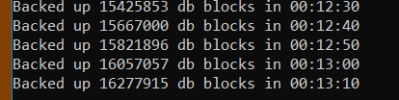
around 20 k Blocks/10sec @ 176 M Blocks total -> 135 min
1704202249122.png

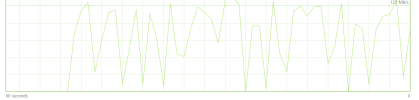
Disk transfer rate is oscillating, but maxes at about 125 MB/s
so i'm wonder if the backup is so slow that the disk has not much to do OR the disk sucks and therefore the backup takes so long
the same virtual disk is used by the aiarchivemanager btw (757 ai Files per day at 8-10 GB total)
1704202551446.png

actual cmd (called via script)
MyDLCDir\probkup online myDb F:\myBackupDir\myDb.bck -verbose -Bp 64
 
Last edited:
hmm
the 90 min were wrong (wishful thinking), usual duration is 160 min :(
so i started a backup after removing the last one, but so far it won't make a big difference
around 20 k Blocks/10sec @ 176 M Blocks total -> 135 min
View attachment 2998

Disk transfer rate is oscillating, but maxes at about 125 MB/s
so i'm wonder if the backup is so slow that the disk has not much to do OR the disk sucks and therefore the backup takes so long
the same virtual disk is used by the aiarchivemanager btw (757 ai Files per day at 8-10 GB total)
View attachment 2999

actual cmd (called via script)
MyDLCDir\probkup online myDb F:\myBackupDir\myDb.bck -verbose -Bp 64
If you are starting the backup using the Windows Task Scheduler beware that this defaults the task priority to low, killing backup performance even when the system is doing nothing else - see Progress Knowledge Base article P169922
 
Thank you Stefan,

That could at least explain the rather long time that Cringer did mention. So probably nothing wrong with disks and so.
Bit weird though that Priority is already 3 (checked the export xml)
Actually the daily backup IS a kind of low priority process and should not slow down routine operation.
But good to know in case a backup is needed fast, it has to be done per cmdline. Going to test this some quiet afternoon...
 
Last edited:
Hello,
In case sbdy is reading this thread in 26
It's been awhile, but im getting on with this (i'm only part-time adm :) after all):
Here's the current plan of action, already tested
  • On conversion server stop warm standby clone of production and do a -RO dumpspecified of recent (2yr) data.
    cut off values have been thoroughly set and validated for some wisely chosen few large tables on a per-table basis
  • DB start command: proserve %DUMPDATABASE% -B 200000 -lruskips 1000 -lru2skips 1000 -n 500
  • All table dumps are started in parallel
  • Individual Dump cmd: CALL %DLC%\bin\_proutil %DUMPDATABASE% -RO -C dumpspecified table.table_id gt %somePivot%
  • Load DB startup goes like
    CALL %DLC%\bin\_proutil %LOADDATABASE% -C truncate -bi 262128 -biblocksize 16
    CALL proserve %LOADDATABASE% -B 2000000 -i -n 300 -bibufs 100 -lruskips 1000 -lru2skips 1000
    CALL probiw %LOADDATABASE%
    CALL proapw %LOADDATABASE%
    CALL proapw %LOADDATABASE%
    CALL proapw %LOADDATABASE%
  • Immedately after dump of a table, the respective load starts. So lots of parallel processes, with 3-4 taking ca. 60 minutes
    CALL %DLC%/bin/_proutil %LOADDATABASE% -i -C load %DIRECTORY%\someTable.bd %SORTFILEOPTION% %BUILDINDEXES% -TB 64 -TM 32 -SG 64 > %DIRECTORY%\someTable.log
  • some tables require dedicated bulkload of *.d file as data can't be separated by a pivot record. These .d files are static and were exported by ABL-script in advance (got a developers license :cool: finally).
  • largest table has 600 mil records and is sort of critical path.
  • total time is 3 hrs
  • add some 20 min finishing touch: stop load db, start single user, do some validating, stop and copy DB to production
Size reduced to a quarter, downtime just within severe pain limit.
btw recently faced ugly bug with vendor legacy ABL code using recid as 32-bit Int, as some tables have crossed that barrier after 2 decades, although record count is only about a third of recid. That misproportion should be handled by a D&L.

I'm on Progress 11.7 , can't upgrade independent of application and an upgrade to the next application version is a major undertaking, that i would tackle AFTER some significant size reduction.

Any ideas to speed up are welcome, thanks in advance
-i did help
-SG 128 no significant effect
 
Last edited:
In my experience, binary load followed by idxbuild is faster and easier to optimize than using "build indexes" on the load. Be sure to back up the database between the load and the build, and then again after the build.

-SG has a maximum value of 64. -r gets you the same boost as -i with less crash risk. Check promon R&D, 2, 5 during the load to see if -bibufs 100 is high enough; are there empty BI buffer waits?

The key to tuning a separate idxbuild is maximizing the use of available resources; taking advantage of multi-threading in both the data scan/key build phase and the merge/sort phase for all areas, based on available cores, and taking advantage of RAM by minimizing or if possible eliminating disk I/O for sorting via -TF. If disk I/O is unavoidable, specify sort files to be on non-db disk(s). Test, record results, tune, test again; log religiously.

Do you know if you have met all the conditions for multi-threaded data scan (-datascanthreads parameter)? The conditions are:
  • you have indicated that you have enough space for disk sorting;
  • the area being scanned doesn't contain any of the indexes that are being rebuilt;
  • the area being scanned doesn't contain any tables that have word indexes;
  • the area being scanned is a Type II area.
 
Thanks Rob, really appreciate the detailed input.

  • -i and the lack of intermediate backups are intentional — this all runs on a conversion server, so in case of failure I just restart. Copy to production only happens after a clean run.
  • Separate data and index areas are in place.
  • For most tables I’m still using inline index build, mainly because they’re not on the critical path anyway — the one,two big tables dominate runtime, so I focused optimization there with binary load + separate idxbuild.
  • I’ll give -datascanthreads / -mergethreads a try (currently at 4, will try 6–8 depending on CPU behavior).
  • On -r: would that add anything on top of -i, or is -i already maxing that out?
  • I’ll also check BI buffer waits during the next run (promon R&D 2 5). What would be the threshold where you’d start increasing -bibufs, and to what range would you typically go?
  • Same for -TF: how do you determine a good value in practice? Just trial until disk I/O disappears, or is there something to watch for in particular (e.g. promon or log hints)?
  • Thanks again — btw last run ~2h50 from ~3h, but will retry to get an idea of the variability of the process
 
Thanks Rob, really appreciate the detailed input.

  • -i and the lack of intermediate backups are intentional — this all runs on a conversion server, so in case of failure I just restart. Copy to production only happens after a clean run.
  • Separate data and index areas are in place.
  • For most tables I’m still using inline index build, mainly because they’re not on the critical path anyway — the one,two big tables dominate runtime, so I focused optimization there with binary load + separate idxbuild.
  • I’ll give -datascanthreads / -mergethreads a try (currently at 4, will try 6–8 depending on CPU behavior).
  • On -r: would that add anything on top of -i, or is -i already maxing that out?
  • I’ll also check BI buffer waits during the next run (promon R&D 2 5). What would be the threshold where you’d start increasing -bibufs, and to what range would you typically go?
  • Same for -TF: how do you determine a good value in practice? Just trial until disk I/O disappears, or is there something to watch for in particular (e.g. promon or log hints)?
  • Thanks again — btw last run ~2h50 from ~3h, but will retry to get an idea of the variability of the process
Tuning explanation and advice for idxbuild:
https://pugchallenge.org/downloads/2013/261_Index_Rebuild_Perf.pptx (audio recording also available)

  • -r and -i will give the same performance benefit. -r allows crash recovery in some scenarios where -i does not.
  • Re: threading, you can also look at -thread and -threadnum; this interacts with -mergethreads.
  • Increase -bibufs if you see empty BI buffer waits during the load. I have had cases where 100 wasn't enough. Try 500.
  • -TF is a percentage of available RAM, and it defaults to 50. I usually start at 80.
  • Also use -rusage. After a test run, look for (17262) and (11480) and (11483) messages in the output. They will tell you about your CPU and temp disk utilization. Ideally, the (11483) message will tell you that you used 0KB of sort disk space (i.e. all of the data fit in the -TF sort buffers in memory).
  • Be sure to look at all of the idxbuild parameters and understand what they do. In some cases (-TB, -TM, -SG) you will use the maximums; other should be tuned.
  • If you have any tables that have word indexes, segregate those tables into their own storage area. Those word indexes do not need to be segregated.
  • Don't use the default -pfactor of 100, unless it is for a table where you don't expect future creates or updates. Otherwise I use 80, to leave room for future inserts.
 
Back
Top