Effect of moving from 128 to 256 RPB

We are in the middle of a clean-up of old data in our database, deleting approximately 25-30% of the contents.
I ran a tabanalys on the db and noticed that more than half of the tables have very small records, thus not filling up our 8k blocks.

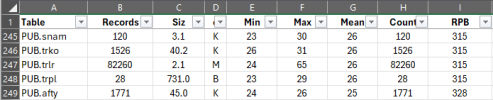
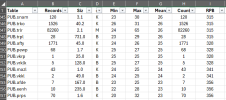
Here is a screenshot of some of our offenders:

1766152354445.png

We have several options:
  1. Do nothing.
  2. Change RPB from 128 to 256
  3. Change blocksize from 8K to 4K
Our db is 4GB and buffer hits are 100% so intervention may not be needed at all. Serious alternative would be to increase RPB to 256 and do a D&L on the database. We have done a D&L a few years ago, which took us ~20 minutes. We can do this again during a weekend, if needed.

Would changing RPB help? And what would be the downside of keeping 256 RPB as a "one-size-fits-all" default instead of 128?
 

Attachments

  • 1766152308910.png
    1766152308910.png
    35.1 KB · Views: 1
Here is a screenshot of some of our offenders:
These tables are so tiny that it isn't worth worrying about doing any tuning for them. Presumably, in this 4 GB database there are some more interesting tables? If a table is very large/fast-growing, it should have its own area. And its indexes should have their own area. Of course, there is a lot more that can be said about good structure design.

Can you post your full dbanalys report and your current and proposed structure?

Would changing RPB help? And what would be the downside of keeping 256 RPB as a "one-size-fits-all" default instead of 128?
What is "Count" in your table? The numbers are the same as the record counts. Is it record fragment count?

RPB 256 is a fine choice, in my opinion, for a multi-table area, assuming 8 KB block size. There is no penalty for not filling a record block's row directory, e.g. if some tables have larger records. In some scenarios, a higher RPB could exacerbate problems with record fragmentation, e.g. if your code creates large numbers of records and later updates/expands the records, so there isn't sufficient space in their record blocks for all of the new field data. So far, it is not clear that you need to worry about that.

I ran a tabanalys on the db and noticed that more than half of the tables have very small records, thus not filling up our 8k blocks.
Disk space is cheap and this database is small. Don't worry about tiny tables or partially-filled blocks. Some gaps are inevitable and harmless, apart from tweaking a DBA's OCD tendencies. ;)

Change blocksize from 8K to 4K
No. 8 KB block size is more efficient.

We are in the middle of a clean-up of old data in our database, deleting approximately 25-30% of the contents.
How are you deleting data? Programmatically? If so, be sure to compact the relevant indexes afterwards, as mass data purges can hurt performance, which catches some people by surprise. Of course, you won't need to do this if you do proceed with a D&L as you will be rebuilding all of your indexes.

Our db is 4GB and buffer hits are 100% so intervention may not be needed at all.
I can't say, based on what I have seen so far. While a low buffer hit ratio is definitely bad, a high buffer hit ratio is not necessarily good. E.g.:
Code:
repeat:
  for each tiny-table no-lock:
  end.
end.
This will give you an excellent buffer hit ratio. That metric, by itself, doesn't mean all is well with database or application performance.

We have done a D&L a few years ago, which took us ~20 minutes.
This analysis/discussion will likely take more of your time than performing the entire D&L. So, apart from the fact that it's 20 minutes out of your free time, why not do it during your Saturday morning coffee break? As you're proposing it as an option, I assume you can afford the downtime.

 
The following is an edge case -- not a general recommendation...

Sometimes you might have a very small and very frequently accessed table. (Actually almost everyone has some of those.) In such a case you may have a lot of contention for BHT and BF1, BF2, BF3, and BF4 latches. The BF* latches are "buckets" that represent the underlying buffer latches - there is actually one latch per block but that would be ridiculous to keep track of so instead activity goes into BF( block# modulo 4 ). In particular you might notice that one of the BF* latches is much more active than the others. This is an indication that you have a "hot spot". (Usually the activity on the BF* latches will be very similar -- within a few percentages of each other, if you see one that is consistently twice as active as the others then you definitely have something unusual going on.)

If this is true then it can be somewhat beneficial (and quite counter-intuitive) to move that tiny little table to a storage area with RPB = 1. Then each record has its own block which may reduce contention for the hot spot. Assuming that the hot spot is not the index root block. Or a single record that *everyone* wants to access.

To repeat myself -- this is an edge case. It might apply if:
  • You have a very small table that is very active
  • You have a lot of contention for BHT and BF* latches
  • There is a "hot spot" showing in the BF* latch activity
It is NOT universally true that you should take this approach with all small tables.
 
repeat: for each tiny-table no-lock: end. end.This will give you an excellent buffer hit ratio. That metric, by itself, doesn't mean all is well with database or application performance.
You can have high buffer hits with records just barely trickling in ....
At least when running client server, try it over wi-fi, ethernet @100 , ethernet @1000 , or a server with abysmally underperforming drives, cpu or both.
Amazingly diffferent results using a table size larger than "tiny" .
Records /s reads can vary from ~300/s (yes that's three digits), to 5000/s . Running it on the same machine as the database should be a five digit number.
 
Back
Top